
Leveraging the NLP Term Database to Uncover Information Gaps: Your Complete NEURONwriter Tutorial
The NLP (Natural Language Processing) term database in NEURONwriter is a set of intelligent semantic clues that tell you exactly which concepts Google’s algorithms and your readers expect to see for a piece of content to be considered “exhaustive.” By using it, you can precisely identify information gaps—topics and angles your competitors have overlooked. Filling these gaps allows you to build authority and secure high rankings in AI Overviews (SGE).
If you aren’t familiar with the foundations of this strategy yet, be sure to read our previous post on Information Gain and how to dominate search results in 2026.
Step-by-Step Instructions: How to Find the “Blind Spots” in Your Niche.
Step 1: Accessing the NLP Term Database.
Before you can analyze, you must provide the tool with the right context.
-
Log in to NEURONwriter and create a new analysis (Query).
-
Once the analysis is generated, go to the Competitors Selection view.
-
The Secret to Success: Select competitors who are niche experts and deselect the giants (like Wikipedia or major news outlets) that write too broadly. Your NLP term base will then be generated based on the highest-quality, most specialized content currently on the web.
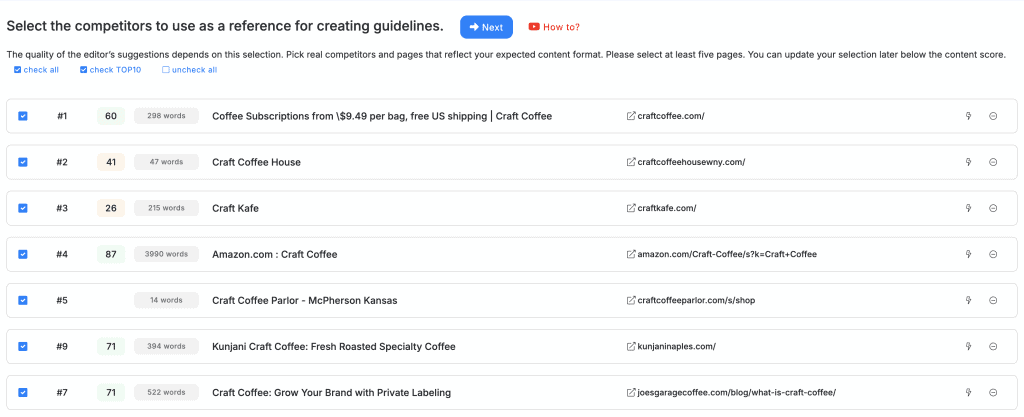
Step 2: Searching the Database for Key Phrases and Entities.
After entering the editor, you will find the Terms panel on the right side. This is where the NLP power resides.
-
Note the tabs: Terms in headings and Terms in article.
-
Use the search field above the term list to check for specific topics, or simply browse the list suggested by the NLP engine.
-
Focus on terms labeled as an Entity—these are specific concepts and objects that Google understands as the foundations of a given field.
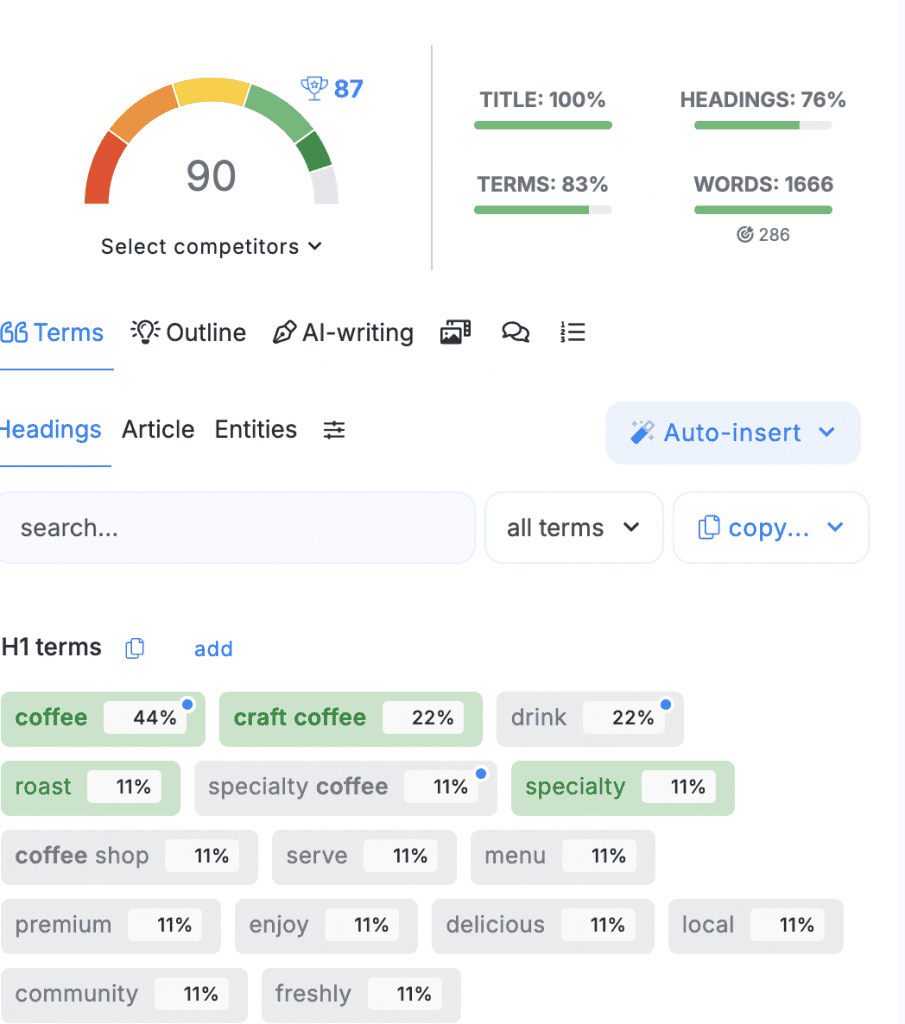
Step 3: Analyzing Results Against Your Own Content
The real magic happens when you compare NEURONwriter suggestions with what you already have in your text (or what you plan to write).
-
Look at the Current/Suggested column.
-
Look for terms with a 0/X status (unused) that are marked as highly important (at the top of the list).
-
If you see a term that your competitors use rarely (e.g., 0–1 times in the TOP 10) but you know is crucial for the topic, you have found your information gap.
Step 4: Identifying Gaps and Expanding Content (Information Gain)
Once you find a missing term, do not simply “stuff” it into a sentence. Build new value around it.
-
Choose a term (e.g., “Water chemistry”) that is poorly addressed by the competition.
-
Create a new H2 or H3 heading that naturally introduces this topic.
-
Use the AI Writing feature in NEURONwriter by selecting “Start writing” for the new heading, and instruct the assistant to include the missing NLP terms. This ensures your text achieves a high Information Gain score, which is vital for [dominating 2026 search results].
Tips and Best Practices
-
Use the “Unused” Filter: In the NLP terms panel, filter the list to see only the phrases you haven’t used yet. This is the fastest way to find missing sub-topics.
-
Interpret Intent, Not Just Words: If NEURONwriter suggests the term “Magnesium ions” in the context of coffee, it means the algorithms are looking for a scientific explanation of how water affects flavor. Don’t ignore it—this is your chance to demonstrate expert E-E-A-T.
-
Avoid “Semantic Stuffing”: Don’t use every term just for the sake of it. Choose those that truly enrich the reader’s knowledge. The quality of answers in AI Overviews depends on logic and depth, not just word density.
Practical Example: A Niche Craft Coffee Guide.
Suppose you are writing an article titled “How to Brew Craft Coffee at Home.” Most of your competitors are writing about grind size and water temperature.
Here is how the NLP term database in NEURONwriter reveals the gaps:
-
You browse the term list and notice the phrases: “Total Dissolved Solids (TDS)” and “Refractometer.”
-
You check the competition—no one mentions these in simple guides.
-
Your Gap: You add a section: “How to Precisely Measure Brew Strength: An Introduction to TDS and Using a Refractometer in Your Home Kitchen.”
-
The Result: Your article becomes the only one in the TOP 10 addressing this professional level of brewing. Google recognizes the unique Information Gain and promotes you as the authority.
Common Errors (And How to Avoid Them)
-
Error: Selecting too many competitors for analysis.
-
How to avoid: Choose only 5–7 pages that actually answer the same question as you. Choosing too many “dilutes” the NLP term base.
-
-
Error: Ignoring terms in the “Headings” tab.
-
How to avoid: Google places immense weight on structure. If a key NLP term (Entity) does not appear in a heading, it will be harder for you to get picked up for AI summaries.
-
-
Error: Writing for the tool instead of the reader.
-
How to avoid: Always prioritize editorial value. If an NLP term doesn’t fit your narrative, don’t use it just to boost your Content Score.
-
Suggested Screenshot for the Tutorial
Image Description: A view of the “Terms” sidebar in NEURONwriter. What to highlight:
-
The “Unused” filter selected.
-
An arrow pointing to a term with a 0/5 status that has high importance (e.g., a darker background or higher ranking on the list).
-
Next to it, the editor window open with a newly created H2 heading containing that missing term. Caption: “Identifying the Gap: Finding NLP terms that competitors (0/5) have failed to include in their content strategy.”
Summary: Consistency is the Key to Success
Regularly using the NLP term database in NEURONwriter is the most effective way to keep your content fresh and competitive. By following this method, you stop repeating what has already been said and start creating materials that set a new standard in your industry.
FAQ: Frequently Asked Questions
What should I do if a suggested term doesn’t fit my article at all?
Do I have to use the term in the exact form NEURONwriter suggests?
How often should I re-analyze content gaps in my published articles?