How to Make AI Understand Your Content: 5 Simple Steps
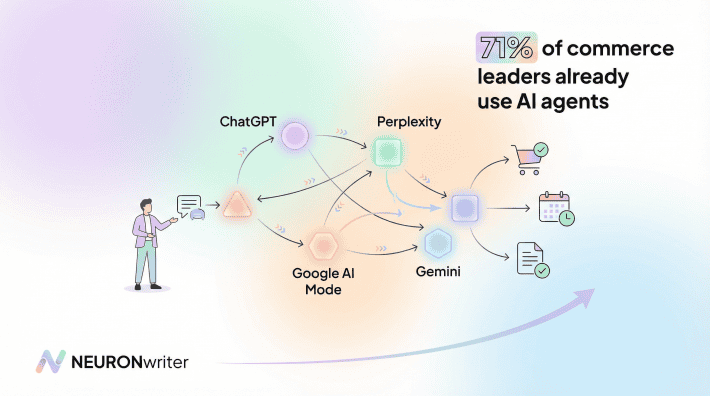
Ever feel like you’re creating great content, but the AI assistants (like ChatGPT or Google’s AI) just don’t seem to get it? You’re not alone. As AI becomes the new way we find information, making our content easy for it to understand is crucial.
But “writing for AI” doesn’t mean creating robotic, boring text. It just means giving the AI a clear roadmap to your content. Think of it as organizing your house before guests arrive they can find everything much easier.
In this guide, we’ll skip the technical jargon and give you five simple, practical steps to make your content instantly more AI-friendly.
Step 1: Give Your Article a Clear Structure
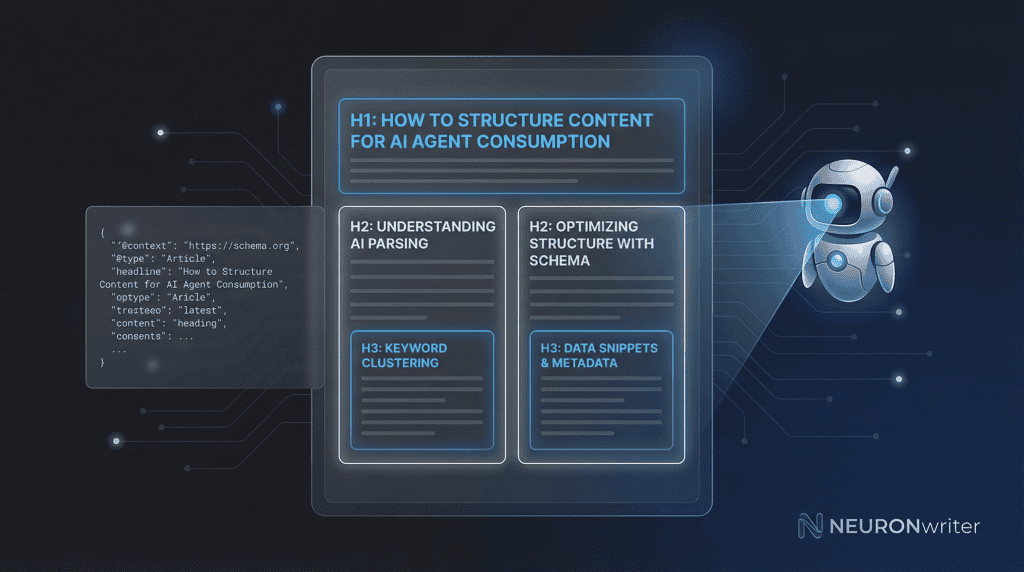
Imagine trying to read a book with no chapters. You’d get lost, right? That’s how an AI feels when it sees an article with no structure. Headings (like the ones in this article) are the chapters and sub-chapters of your content.
Why it matters: AI doesn’t “read” like we do. It scans the structure to understand the main ideas. A clear structure is the most important signal you can send.
How to do it right:
- Think of your title as the book’s title. There should only be one main title.
- Use main headings for your key topics. These are your “chapters.”
- Use sub-headings for points within those topics. These are the sections within your chapters.
Bad Example (A Jumble of Text)
All About Cats
Cats are great pets. There are many breeds, like Siamese and Persian. You need to feed them and take them to the vet. They like to play with toys.
Good Example (A Clear Outline)
All About Cats
Cats are great pets. Here’s what you need to know.
Common Cat Breeds
- Siamese
- Persian
Caring for Your Cat
- Feeding
- Vet Visits
- Playtime
See the difference?
The second version is instantly easier for both a human and an AI to understand.
Step 2: Add “Cheat Sheet” Labels for the AI.
Imagine you’re moving houses. You label your boxes: “Kitchen,” “Books,” “Clothes.” This helps the movers know what’s inside without opening them. “Schema” is just a fancy word for these labels, but for AI.
Why it matters: It removes all the guesswork. Instead of the AI trying to figure out if your page is an article, a recipe, or a product, you can tell it directly.
How to do it right: You don’t need to learn a new language. Just know what the labels are telling the AI. For a blog post, you’re essentially giving the AI a note that says:
*”Hi AI, this is an Article. The headline is ‘How to Make AI Understand Your Content’. The author is Jane Doe, and it was published on July 8, 2026.”
Most modern website tools and plugins can add these labels for you automatically. In NEURONwriter, for example, this is built-in, so you get the benefit without the work.
Step 3: Provide a “Distraction-Free” Version.
Imagine trying to read a book while a TV is blaring and people are talking. It’s hard to focus. That’s how an AI feels when it looks at a webpage with ads, pop-ups, and complex design elements.
Why it matters: AI just wants the pure information. By providing a super-simple, text-only version of your article, you’re giving it a “quiet room” to read in. It can understand your content much faster and more accurately.
How to do it right: This is a bit more advanced, but the idea is simple: create a plain-text copy of your article and link to it in the page’s code. It’s like telling the AI, “Hey, if you want to skip all the design and just get the words, here’s a clean copy for you.”
Step 4: Clearly Separate Any Special Instructions.
If your content includes things like a recipe, a list of steps, or a tutorial, it’s vital to separate them from the main text.
Why it matters: An AI needs to know the difference between your story about baking a cake and the actual recipe. If it’s all mixed together, the AI gets confused.
Bad Example (Mixed Together):
I love baking apple pie. It reminds me of my grandmother. You’ll need 6 apples, some flour, and sugar. First, you peel the apples. It’s a lot of work but worth it. Then you mix the flour and sugar. My grandmother always used a special bowl for this part. Then you bake it for 40 minutes.
Good Example (Clearly Separated):
I love baking apple pie. It reminds me of my grandmother. It’s a lot of work but worth it. My grandmother always used a special bowl for this part.
Apple Pie Recipe
Ingredients:
- 6 Apples
- 1 cup Flour
- 1/2 cup Sugar
Instructions:
1.Peel the apples.
2.Mix the flour and sugar.
3.Bake for 40 minutes.
This clear separation makes it easy for an AI to pull out the recipe and show it to someone who asks, “How do I make an apple pie?”
Step 5: Use a Simple and Clear Web Address (URL)
Your page’s web address is like the sign on a storefront. It should tell people what’s inside.
Why it matters: A URL like www.example.com/page?id=42 gives the AI no clues. But a URL like www.example.com/how-to-bake-apple-pie is perfectly clear. It helps the AI instantly categorize your page.
How to do it right:
- Use a few words that describe your article’s topic.
- Keep it short and easy to read.
- Use hyphens (-) to separate the words.
This is one of the simplest yet most effective ways to help AI understand your content.
It’s All About Clarity
Making your content AI-friendly isn’t a technical chore; it’s about being clear and organized. By using these five simple steps, you’re not just helping machines — you’re also making your content better and easier to read for your human audience. And tools like NEURONwriter are designed to do most of this work for you, letting you focus on what you do best: creating great content.
How NEURONwriter Helps You Achieve Optimal Results
If all this seems too complicated, and you’re already comfortable writing content, that’s where NEURONwriter comes in. Think of it as your content co-pilot—it handles the structural and technical aspects, so you can focus on your ideas.
When you write in NEURONwriter, it automatically guides you toward a clear headline structure. It analyzes the best-selling articles online on a given topic and shows you exactly what your content needs to cover to be comprehensive. The result is an article that’s naturally organized not only for readers but also for AI agents.
Beyond structure, NEURONwriter’s built-in NLP analysis ensures your content uses the right language and addresses the right topics that AI systems are looking for. And what about the “cheat sheet” labels we discussed in Step 2? It automatically generates them, including labels for FAQ sections, so you get all the benefits without having to write a single line of code.
The goal is simple: You write great content, and NEURONwriter makes sure the whole world both humans and AI can understand and find it.
FAQ
Do I need to be technical to apply these steps?
Not at all. Steps 1, 4, and 5 require no technical knowledge whatsoever — they are purely about how you write and organize your content. Step 2 (the “cheat sheet labels”) is handled automatically by most modern website plugins and tools like NEURONwriter. Step 3 is the most advanced, but it’s optional and something a developer can set up for you in minutes.
Will doing this actually make a difference to my traffic?
Yes, and the impact is growing. As more searches are answered directly by AI (without users clicking through to websites), being the source that the AI cites becomes the new goal. A well-structured, clearly labelled article is far more likely to be cited than a disorganized one.
How long does it take to restructure an old article?
For most articles, restructuring the headings and cleaning up the URL takes less than 30 minutes. Adding the “cheat sheet labels” with a plugin takes just a few clicks. It’s one of the highest-return, lowest-effort improvements you can make to existing content.
Does this only matter for Google, or for other AI tools too?
It matters for all of them. Whether it’s Google AI Mode, ChatGPT, Perplexity, or any other AI assistant, they all rely on the same fundamental signals: clear structure, accurate labels, and well-organized information. Optimizing for one effectively optimizes for all.
What’s the single most important step if I can only do one thing?
Start with Step 1: your heading structure. It’s the foundation everything else is built on. A clear, logical hierarchy of headings is the most powerful signal you can send to any AI system, and it costs nothing but a few minutes of thought.