
Purpose and Marketing Positioning
The Monitored discussions module is the operational center for tracking the exact questions, prompts, and market conversations that matter to a brand. While the Overview module summarizes performance, Monitored discussions shows which individual prompts are being tracked and how each prompt performs across AI answer sources such as Google AI Overviews, AI Mode, ChatGPT, and Perplexity.
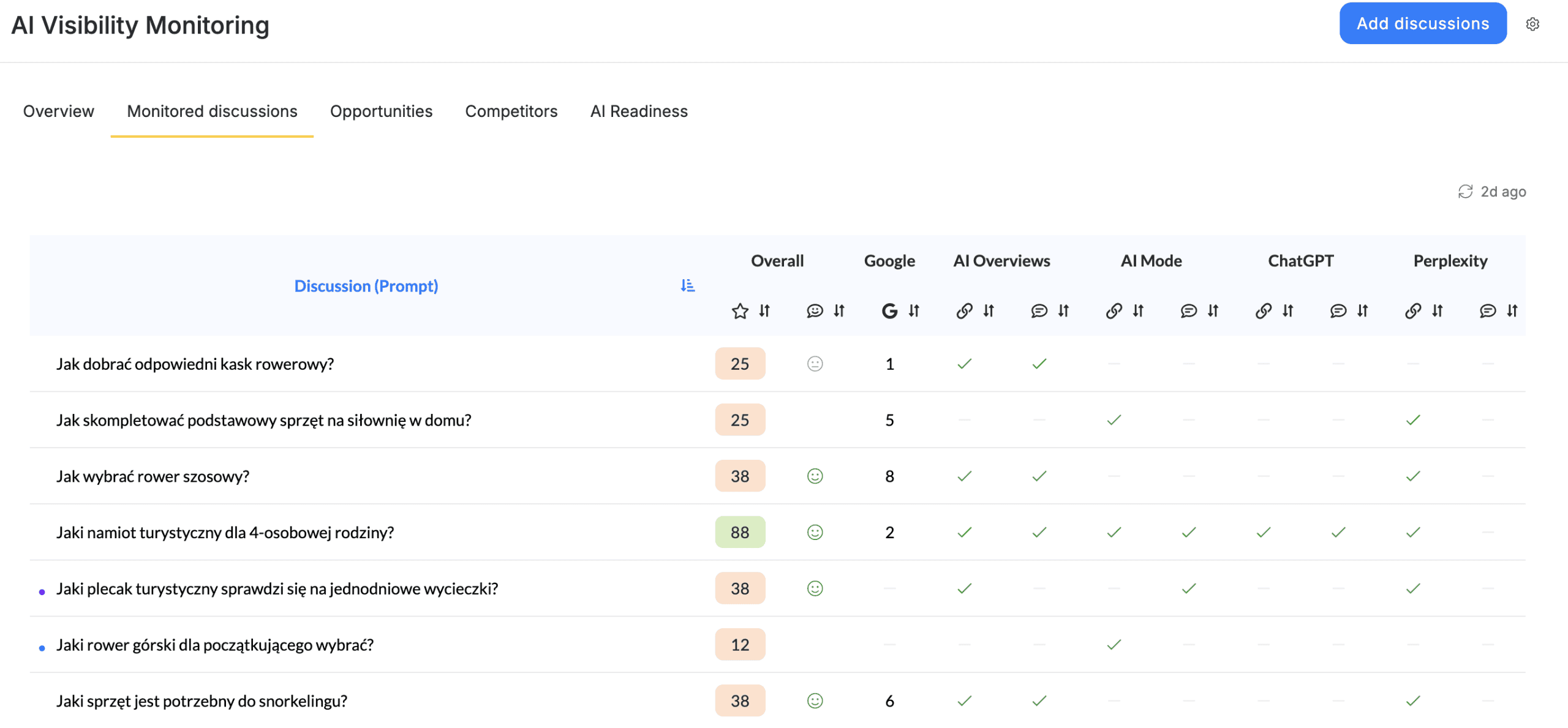
From a marketing perspective, this module converts abstract AI visibility into a prompt-level measurement system. It helps teams understand where the brand is present, where it is absent, and which customer questions are most important for content, SEO, PR, and authority-building work. This makes the module particularly useful for teams that want to monitor buying-intent questions, comparison queries, problem-aware searches, category education topics, and reputation-sensitive prompts.
|
User Need |
How Monitored Discussions Helps |
Marketing Outcome |
|
Track important market questions |
Lists the prompts selected for AI visibility monitoring. |
Creates a repeatable monitoring set for campaigns and reporting. |
|
Compare performance by prompt |
Shows an overall score for each monitored discussion. |
Identifies topics where the brand is strong or weak. |
|
Compare AI sources |
Displays source-level indicators for Google AI Overviews, AI Mode, ChatGPT, and Perplexity. |
Reveals whether visibility differs by AI platform. |
|
Prioritize content work |
Highlights prompts with low or missing scores. |
Helps content teams focus on the questions most likely to improve AI visibility. |
|
Monitor progress over time |
Shows the last update timing and can be reviewed repeatedly. |
Supports recurring AI visibility reporting. |
The Monitored discussions module should be used as the source of truth for prompt-level AI visibility. It defines what the system is watching and shows where each discussion stands.
Understanding the Table
The table contains a list of monitored prompts and a score or indicator for each prompt. In the inspected project, the visible table included prompts such as “Affordable AI content generation for SEO,” “What are the best tools for semantic SEO?” and “What is the best content optimization tool for freelancers?”
|
Column |
Meaning |
How to Interpret It |
|
Discussion (Prompt) |
The question or discussion being monitored. |
This should represent a real customer, buyer, or market question. |
|
Overall |
A consolidated score for the prompt. |
Higher values suggest stronger visibility across monitored AI sources. |
|
Google AI Overviews |
Prompt-level visibility indicator for Google AI Overviews. |
Use it to assess whether the brand appears in Google’s AI-generated results. |
|
AI Mode |
Prompt-level visibility indicator for Google AI Mode. |
Use it to understand visibility in AI-first Google experiences. |
|
ChatGPT |
Prompt-level visibility indicator for ChatGPT. |
Use it to evaluate whether conversational AI recommends or mentions the brand. |
|
Perplexity |
Prompt-level visibility indicator for Perplexity. |
Use it to evaluate visibility in answer engines that frequently cite sources. |
Step-by-Step: How to Use Monitored Discussions
- Open the project and go to AI Visibility. Then select the Monitored discussions tab from the AI Visibility Monitoring navigation.
- Review the list of monitored prompts. Each prompt should correspond to a market discussion that the brand wants to influence. Good prompts are usually phrased as natural questions, for example, “What are the best tools for semantic SEO?” or “How can I optimize my website content for Google?”
- Start with the Overall column. Prompts with low or zero values should be treated as immediate candidates for investigation. These are the discussions where the brand is not yet visible enough or where the content ecosystem may not support the brand’s presence.
- Compare the indicators across AI sources. If a prompt performs in one source but not another, the issue may not be the prompt itself; it may be the difference between how AI systems discover, summarize, cite, or recommend sources.
- Use the prompt list as a planning input. For every low-performing prompt, decide whether the next action should be content creation, content optimization, digital PR, brand mention acquisition, technical improvement, or competitive analysis.
- Use the row-count and pagination controls when the project contains many prompts. This helps users review large monitoring sets without losing track of the current page.
- Check the update timing. The visible interface showed a recent update indicator, such as “23h ago,” which helps users understand how fresh the monitoring data is.
- If important questions are missing, use Add discussions to add new prompts. The side panel allows users to add questions manually, one per line, or use AI Suggest to generate prompt ideas.
Adding New Monitored Discussions
The Add discussions button opens a side panel titled “Monitor discussions.” The panel explains that users can add questions or prompts to track brand visibility across AI platforms. Users can choose between manual entry and AI-assisted suggestion.
|
Method |
Best For |
Recommended Use |
|
Add questions |
Users who already know which prompts they want to track. |
Paste or type one prompt per line, then accept the list. |
|
AI Suggest |
Users who need help generating relevant monitoring questions. |
Use it to expand the monitoring set around a topic, product, or market category. |
When adding prompts manually, users should avoid overly broad or vague questions. A strong monitored discussion should be specific enough to represent a real search intent and broad enough to matter for the market. For example, “What is the best AI writer for long-form content?” is more useful than “AI writing” because it reflects a clear decision-making context.
Recommended Prompt Strategy
Marketing teams should build a balanced monitoring set rather than tracking only generic category keywords. The strongest AI visibility monitoring programs usually include prompts from several intent levels: educational prompts, comparison prompts, purchase-intent prompts, problem-solution prompts, competitor prompts, and brand-specific prompts.
|
Prompt Type |
Example |
Why It Matters |
|
Educational |
“How can I improve my content score for search engines?” |
Captures early-stage users who are learning about the problem. |
|
Solution-oriented |
“Can AI help with internal linking suggestions?” |
Captures users looking for a practical approach. |
|
Category comparison |
“What are the best tools for semantic SEO?” |
Captures buyers comparing available solutions. |
|
Product selection |
“What is the best AI writer for long-form content?” |
Captures users close to choosing a tool. |
|
Freelancer or segment-specific |
“What is the best content optimization tool for freelancers?” |
Captures high-relevance niche buyer contexts. |
Practical Example
In the inspected project, the prompt “Jak dobrać odpowiedni kask rowerowy” showed an overall score of 25, while several other prompts showed higher results. A marketing team could interpret this as a signal that the brand has some visibility in one monitored discussion but lacks visibility across other important questions. The next step would be to open Opportunities and review what content, source, or mention actions could improve those low-performing discussions.