
Purpose and Marketing Positioning
The Opportunities module turns AI visibility monitoring into an actionable marketing workflow. It identifies concrete tasks that can help the brand improve visibility in AI-generated answers, including opportunities to earn external mentions, optimize existing content, or create new content assets. In the inspected project, the module showed controls for grouping, filtering by opportunity type, filtering by status, and ordering opportunities by potential.
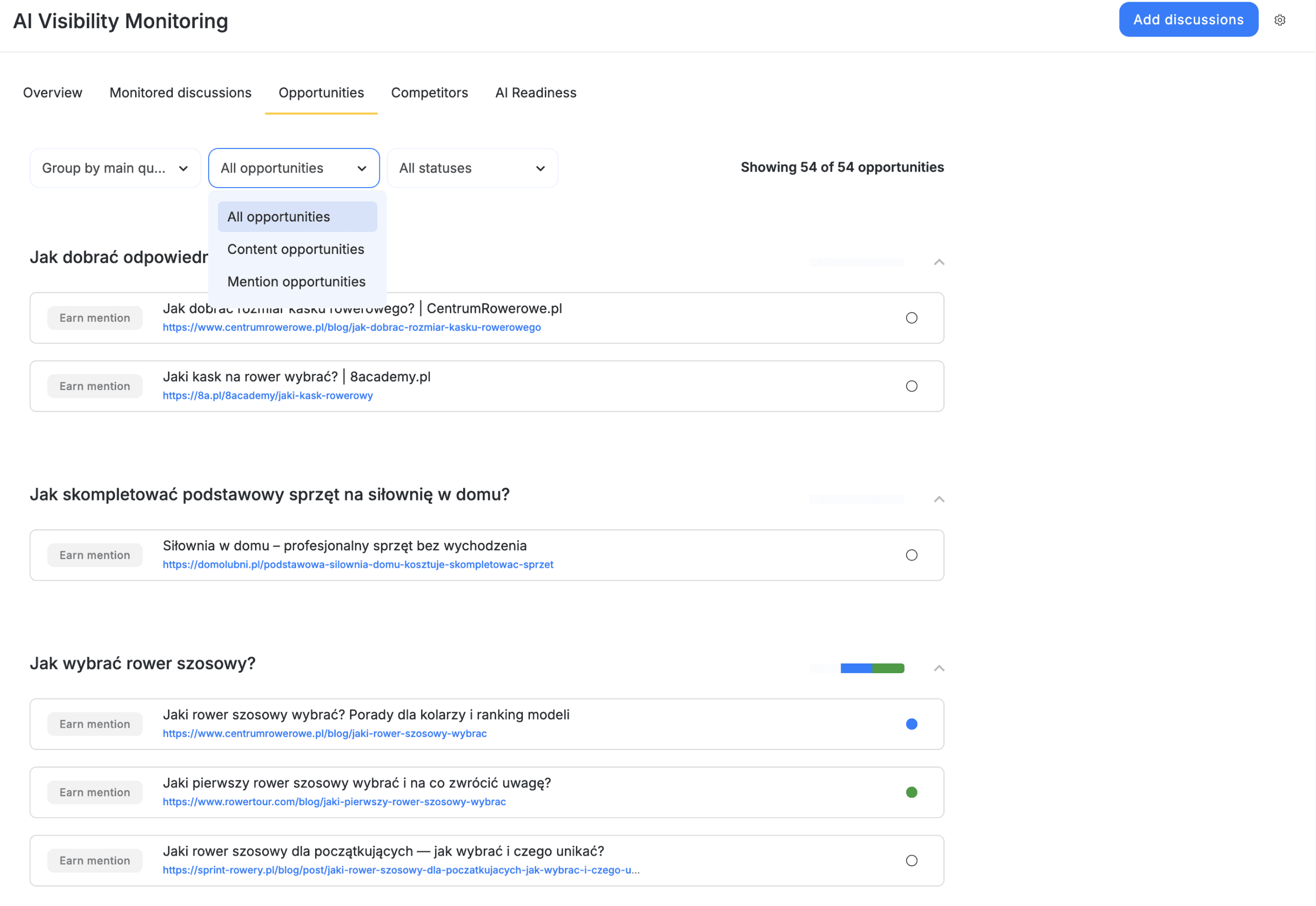
From a marketing perspective, this module answers the question: “What should we do next to improve our presence in AI answers?” It is the bridge between measurement and execution. Instead of asking users to interpret low scores manually, the module organizes recommended actions around monitored discussions and provides source URLs, task types, and status controls so teams can manage AI visibility work like a campaign pipeline.
|
Opportunity Feature |
Marketing Meaning |
Business Value |
|
Earn mention |
External pages or discussions where the brand could be included. |
Supports digital PR, outreach, partnerships, and mention-building. |
|
Optimize |
Existing content or prompt-related assets that may need improvement. |
Helps increase relevance, clarity, and usefulness for AI-generated answers. |
|
Create |
Suggested new content where a coverage gap exists. |
Helps fill missing topic authority and answer important user questions. |
|
Grouping by prompt |
Organizes opportunities under the monitored question they support. |
Keeps work tied to real market discussions rather than generic tasks. |
|
Status filters |
Allows opportunities to be managed as a workflow. |
Helps teams track what is planned, in progress, completed, rejected, or not assigned. |
The Opportunities module should be used as the execution layer of AI visibility management. It helps teams move from “we are not visible” to “these are the actions we can take.”
Understanding the Opportunity Workflow
The module displays opportunities grouped around monitored discussions. In the inspected interface, examples included the prompt “Affordable AI content generation for SEO” and several recommended tasks such as earning mentions from relevant pages, optimizing content, and reviewing sources that already appear in the market conversation.
The visible filters allow users to narrow the task list by opportunity category and workflow status. This is important because AI visibility improvement can involve multiple teams. Content teams may handle optimization and creation tasks, while PR or partnerships teams may handle mention opportunities. Status management keeps the work coordinated.
|
Control |
What It Does |
Recommended Use |
|
Group by main question (prompt) |
Organizes opportunities by the monitored discussion they support. |
Use this view when planning actions around individual prompts. |
|
All opportunities |
Filters by opportunity type, including content and mention opportunities. |
Use it to focus on one workstream at a time. |
|
All statuses |
Filters by TODO, In progress, Done, Rejected, or No status. |
Use it during campaign reviews or team handoffs. |
|
Order by potential |
Prioritizes opportunities by expected impact. |
Start with high-potential items when resources are limited. |
Step-by-Step: How to Use the Opportunities Module
- Open AI Visibility in the selected project and choose the Opportunities tab. The module will display available opportunities connected to the monitored discussions.
- Review the opportunity count at the top of the page. In the inspected project, the interface showed 57 of 57 opportunities, which indicates that the current filters were displaying the complete available opportunity set.
- Choose the grouping method. For most users, Group by main question (prompt) is the easiest starting point because it shows which monitored discussion each opportunity supports.
- Select the opportunity type filter. Use All opportunities for a complete review, Content opportunities when planning writing and optimization work, or Mention opportunities when planning outreach, PR, or source inclusion work.
- Select the status filter. During planning, use TODO or No status to identify work that has not yet been assigned. During progress reviews, use In progress. After completion, use Done to keep a record of executed actions. Use Rejected when an opportunity is not relevant, too risky, or not worth pursuing.
- Review each opportunity under its monitored prompt. Pay attention to the opportunity type, the title, and the URL. An external URL may indicate a page, article, forum thread, or source where earning a mention could improve AI visibility.
- Assign or update the status. The interface provides status controls so that each opportunity can move through the workflow. This prevents the opportunity list from becoming a static report and turns it into an active task board.1
- Translate the opportunity into a concrete marketing action. For example, an “Earn mention” opportunity may become an outreach task, a “Create” opportunity may become a new article brief, and an “Optimize” opportunity may become an update to an existing content piece.
- Return to Monitored discussions and Overview after completing actions. This allows the team to check whether the work eventually improves prompt-level scores, brand mentions, domain citations, or overall Share of Voice.
Recommended Operating Model
The Opportunities module is most effective when integrated into a weekly or biweekly marketing operating rhythm. Teams should review new opportunities, assign ownership, update statuses, and connect completed actions to later changes in AI visibility metrics.
|
Role |
Responsibility in Opportunities |
Example Action |
|
SEO Manager |
Prioritizes opportunities by topic, source, and ranking context. |
Selects high-potential prompts and maps them to content improvements. |
|
Content Strategist |
Converts Create and Optimize opportunities into briefs. |
Writes or updates pages that answer the monitored prompt more clearly. |
|
Digital PR Specialist |
Works on Earn mention opportunities. |
Contacts relevant publishers, communities, or partners when appropriate. |
|
Marketing Manager |
Tracks statuses and campaign progress. |
Reviews TODO, In progress, Done, and Rejected items during team meetings. |
|
Analyst |
Connects completed opportunities to visibility changes. |
Compares results in Overview and Monitored discussions after execution. |
Practical Example
In the inspected project, the prompt “Jak wybrać rower szosowy” included several Earn mention opportunities from external pages and one Optimize task connected to the monitored topic. A marketing team could use this list to decide whether the fastest improvement path is to update its own content, pursue mentions on high-relevance third-party pages, or create a stronger resource that answers the prompt directly.
Best Practices
Treat opportunities as campaign tasks, not as passive recommendations. Each opportunity should have an owner, status, and expected outcome. When a team completes an opportunity, it should document what changed, when it changed, and which monitored discussion the action was intended to influence. This makes it easier to connect AI visibility improvements to real marketing activity.
|
Best Practice |
Why It Matters |
|
Prioritize by monitored prompt, not only by URL. |
AI visibility is tied to user questions, so the prompt context matters. |
|
Separate content work from mention work. |
Different teams, skills, and timelines are required. |
|
Use statuses consistently. |
A clean workflow makes campaign reporting easier. |
|
Revisit completed work after data refreshes. |
AI visibility may change after crawlers and AI systems update their answers. |
|
Reject low-quality opportunities. |
Not every mention source is worth pursuing; brand quality and relevance matter. |