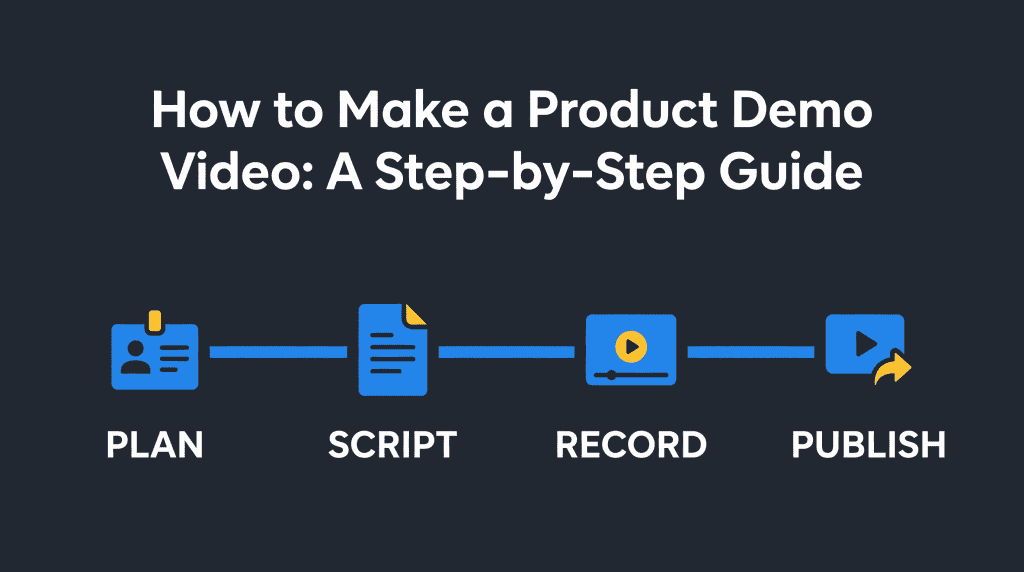
How to Make a Product Demo Video: A Step-by-Step Guide
Semantic Summary
Idea
A product demo video shows a real product solving one clear problem for a specific viewer and explains how the product works in practice.
Challenge
Many demos lose people by listing too many features, using an unclear story, or showing a cluttered product screen.
Summary
Choose one audience and one outcome, script a short problem-to-result walkthrough, record a clean product flow, add reviewed captions, then publish and measure it where buyers need it.
Related Reads
- Video SEO vs. Blog Content: A Strategic Guide
- YouTube SEO: The Ultimate Guide to Optimizing Videos
- Video Transcript SEO: Turn a Transcript into Searchable Page Content
- Video Schema: Make Video Content More Discoverable
What a Product Demo Video Should Do
A product demo video should help one kind of viewer understand how your product solves one real problem. It is not a tour of every feature. Show a clear starting situation, the few actions that matter, and the useful result.
For example, a project-management product demo might show a team moving a campaign from a scattered spreadsheet into one shared board. The viewer should be able to see what changed and why it matters, rather than hear a list of buttons.
Product demo vs. explainer video
A product demo shows the product in use. An explainer video teaches a broader idea or describes a problem that may exist beyond your product. The two can overlap, but choosing one main job makes the script easier to follow.
Choose one viewer, one problem, one next action
Before you write a script, fill in this sentence: “For [type of viewer] who needs to [task], this product helps by [outcome].” Then choose one next action for the viewer, such as starting a trial, exploring a feature, or speaking with your team. One video can mention other benefits, but it should not ask viewers to do several unrelated things.
Plan the Demo Before You Record
Plan the story and the screen before opening a recorder. A short preparation step helps you avoid retakes, distracting detours, and claims that the product screen does not prove.
Choose the workflow that proves the value
Pick the smallest real workflow that demonstrates the promised result. Write down the starting point, two or three important actions, and the result the viewer should notice. If the product needs a longer explanation, split it into separate videos by task or audience.
Use real product language and accurate screens. Do not show customer data, private messages, or unreleased features unless you have permission and a safe recording environment. Prepare a demo account with sample data, close unrelated tabs, and turn off notifications.
Pick a format: screen recording, live walkthrough, or animation
Choose a format for SaaS or another product that makes the product easiest to understand. A screen recording works well for software workflows. A live presenter can add a human explanation. Animation can clarify a concept that is hard to film, but it should not imply that the product already does something it cannot do.
| Format | Works well when | Watch out for |
| Screen recording | The viewer needs to see a real interface or task. | Small text, cursor movement, and unrelated screen details can distract. |
| Presenter plus screen | A short explanation or personal introduction builds context. | The presenter should not cover key parts of the interface. |
| Animation or motion graphics | You need to explain an abstract process or connect multiple scenes. | Keep the visuals consistent with what the product actually does. |
Write a Short Product Demo Video Script
A useful product demo script follows a simple sequence: problem, product action, result, and next step. Write the narration and screen actions together so that what viewers hear matches what they see.
Start with a concrete situation the intended viewer recognizes. Show the product handling that task. Explain the outcome in plain language, then finish with one call to action. Avoid opening with company history or a long list of features.
A simple problem → action → result → next step structure
- Problem: Name the task or frustration in a sentence.
- Action: Show the product doing the relevant steps, without unnecessary clicks.
- Result: Point out what becomes easier, clearer, or faster. Use a real, supportable claim.
- Next step: Tell viewers one useful action to take.
Example product demo video script template
Use this short template and adapt it to the actual product:
Opening: “If you [audience task], you may be spending time on [specific problem].”
Show: “Here is how [product] handles it: first [action one], then [action two].”
Outcome: “Now you can [visible or verifiable result].”
Next step: “To try this workflow, [one clear call to action].”
Keep the words conversational. Read the script aloud while watching the planned screen actions. If a sentence describes something not visible, add a relevant shot or simplify the narration.
Record and Edit the Product Demo Video
Record the product flow in a calm, easy-to-follow way, then edit only what improves clarity. Viewers should be able to read the interface, understand the cursor actions, and hear the narration without strain.
Capture a clear screen and steady walkthrough
Use a clean screen, readable display size, and consistent cursor movement. Pause briefly before important actions so viewers can follow. Record a few seconds of quiet at the start and end; this makes trimming easier. If a single take contains an error, re-record that step rather than rushing through the rest.
Do a test recording before the full walkthrough. Check that the screen is sharp, the microphone is clear, and any webcam framing does not block the product. Keep music low or leave it out when it competes with speech.
Add narration, on-screen cues, and reviewed captions
Explain why an action matters, not just which button you click. Use brief on-screen labels to call attention to an important result, but avoid covering controls or small text. If you use a voiceover, record it after the screen capture so you can match the explanation to the final edit.
Add captions and review them against the audio. Captions should include spoken content and meaningful sounds, and should not hide important parts of the screen. The W3C notes that automatically generated captions may be inaccurate and need editing; captions are also an accessibility requirement for prerecorded synchronized media in the applicable WCAG success criterion.
Keep the pace and length suited to the video’s placement
There is no universal best length. A short product-page introduction may need only a quick overview; buyers who want more detail can use a longer follow-up video; a sales follow-up can be longer if the viewer has asked for detail. Remove repeated points and pauses that do not help the story. If the video feels long, split it by task rather than cutting out context the viewer needs.
Publish and Share the Demo
Publish the video where the intended viewer can find and watch it, then make the surrounding page clear. A demo embedded in a product page should support that page’s purpose; a dedicated watch page makes sense when watching one video is the main reason to visit.
Choose where the video will live
Use a channel that fits the audience and how the video will be shared: a product page, a help article, an email follow-up, or a public video channel. Keep the page accessible without unnecessary steps, and check playback on mobile as well as desktop.
Add an accurate title, description, thumbnail, and accessible page
Give each video a clear title, a short description, and a useful thumbnail that reflects the actual demo. Google’s video guidance recommends unique video information and explains that a dedicated watch page is one where a single video is the page’s main content. Search visibility is not guaranteed by publishing a video or adding markup; the page and video must also be discoverable and eligible.
If your site uses video structured data, make sure its details match the video. Google lists name, thumbnailUrl, and uploadDate as required properties for VideoObject; it recommends contentUrl when available, or embedUrl as an alternative. Do not add structured data for information viewers cannot see.
Measure and Improve the Next Version
Measure whether the demo helps viewers take the intended next step, not just how many people press play. Combine viewing data with page actions and feedback from sales or support.
| Signal | What it can tell you | What to try next |
| Starts and plays | Whether the video is being opened on the page or channel. | Check placement, thumbnail, and whether the page makes the video easy to notice. |
| Completion or drop-off | Where viewers stop watching. | Review that moment for a slow intro, confusing step, or unnecessary detail. |
| Clicks on the next action | Whether the video leads viewers to the chosen action. | Make the call to action clearer and align it with the viewer’s stage. |
| Questions and feedback | What viewers still do not understand. | Clarify the relevant section or make a separate short video. |
Compare videos with similar audiences and placements. A short social clip and a longer sales follow-up serve different purposes, so raw view counts are not a fair comparison. Review the demo after major product changes and update any screen, narration, or claim that is no longer accurate.
Product Demo Video Examples: Show One Useful Outcome
A strong product demo video example is specific enough for a viewer to picture using the product. For a SaaS product, show one common task from the first click to a visible result; for a physical product, show the item being used in a real setting and explain what the viewer should notice.
For example, a billing platform could demonstrate how a small business creates and sends one invoice. A team collaboration product could show how a request moves from intake to assignment.
These short product demo video examples are not claims about results; they are simple story patterns that make the product’s purpose easy to follow. A product demo video should demonstrate your product accurately, not rely on abstract promises.
Product Demo Video Costs: What Affects the Budget?
Video costs depend on the format, the number of scenes, whether you need a presenter, and how much editing or review is required. A team can start with a basic screen recording and a short voiceover, then decide whether the video needs more production work.
Teams that require custom filming, animation, or several rounds of review may work with a production specialist. There is no single price that fits every product demo; product demo videos cost more when they need custom filming, multiple scenes, or extensive review.
To compare options fairly, estimate the full video production effort: planning and scriptwriting, recording, editing, captions, approvals, and future updates. A low-cost first version can still be effective if it is clear, accurate, and easy to revise. Do not spend on effects before you know which customer question the video needs to answer.
How to Make a SaaS Product Demo Video
A SaaS product demo video works best when it shows one real software task from start to finish. Pick a task that matters to the target audience, such as setting up a report or reviewing an approval, then show only the screens and steps needed to complete it. This keeps a software demo focused even when the product has many features.
For a product launch video, introduce what changed and who benefits before showing the new workflow. For a sales video, use a familiar buyer problem and a clear next step. The same recording can be adapted into shorter product videos, but each version should have a purpose and an accurate product story.
Simple Tools and Video Production Choices
You do not need a complex video production setup for every demo. A screen recorder, a microphone, and a basic video editor can be enough for a clear walkthrough; a free tool may suit an early draft, while a team with strict brand or privacy needs may choose a more controlled setup. Review the permissions, data handling, and export quality before recording sensitive product screens.
If you create a demo video online, decide first whether you need a downloadable file, an embedded video, or a live walkthrough. Those formats affect framing, captions, file size, and where viewers will watch. Keep your first demo simple, then add production polish only when it solves a real viewing problem.
Should You Use AI or an Interactive Demo?
AI can help you brainstorm a first script or reorganize notes, but a person who knows the product must check every claim, screen action, and feature name.
Do not publish generated narration or product details without review. An interactive demo is different from a product demo video: it lets viewers explore a guided product flow themselves, while a video presents a fixed recording. Choose the one that suits the viewer’s task; they can also support each other.
If buyers want a quick overview, a short video may be enough. If they need to inspect a workflow at their own pace, an interactive demo may help. A SaaS product team can use a video to introduce the product and link to a hands-on walkthrough for viewers who want more detail.
How NEURONwriter Helps Prepare the Content Around a Demo
NEURONwriter can help you research and organize the words around a product demo, but it does not record or edit video. Use its content features to prepare a more accurate script or the page that hosts the video:
- YouTube Ideas surfaces existing videos related to a focus keyword, which can help you see what viewers already encounter and find topic angles. It is inspiration and research, not a video generator. See the YouTube Ideas feature explanation.
- Content Designer can help structure a landing page or supporting article around the demo. Its AI Profile can organize project details such as products, audience personas, and brand voice from supplied materials. Verify every product claim against current source documents. Learn about Content Designer.
- Custom AI Templates let you create your own repeatable writing prompt. A team could set up a template for a problem–action–result–next-step script, then review and correct the generated draft. This is a custom workflow, not a built-in video-script tool. See the Custom AI Templates guide and Content Ideas for related content-planning features.
For video-specific search tasks, also see NEURONwriter guides to YouTube SEO, video transcript SEO, and video schema.
FAQ
How do I make a product demo video step by step?
Choose one audience and problem, plan a short workflow that proves the product’s value, write a problem–action–result–next-step script, then record and edit the demonstration. Add reviewed captions, publish it where the viewer needs it, and measure plays and next actions.
What should a product demo video include?
Include a recognizable customer problem, the product in action, the most relevant result, and one clear next step. Add only the context viewers need to understand the workflow. Avoid trying to show every feature in one video.
How long should a product demo video be?
Use the shortest length that fully explains the task for its intended placement. A brief product-page preview may be much shorter than a detailed sales follow-up. Remove repeated content, and split a long walkthrough into focused videos if needed.
Can I make a product demo video without a video team?
Yes. A clear outline, a screen recording, a simple edit, and a reviewed caption file can be enough for a first version. Test the result with someone who was not involved in making it; if they can explain the product’s main value and next step, the video is doing its job.
What is the difference between a product demo and an explainer video?
A product demo shows a specific product solving a task. An explainer video focuses on teaching an idea or describing a broader problem, even when it mentions a product. Pick the format based on what the viewer needs to understand next.
Do product demo videos need captions?
Captions make spoken content available to people who are Deaf or hard of hearing and help viewers who cannot play audio. W3C guidance says captions for prerecorded synchronized media are required under the applicable WCAG criterion, except when the video is clearly only an alternative to text already provided. Review automatic captions for errors before publishing.
Does adding video schema guarantee that a demo will rank in Google?
No. Structured data can help Google understand video information, but Google does not guarantee that a page will appear with a video feature. The video still needs to be accessible to crawling systems, properly described, and genuinely watchable on the page.
How can I tell whether a product demo video is working?
Start with the action the video is meant to support. Review starts, watch completion or drop-off, clicks on the call to action, and questions viewers still ask. Use those signals together; a large view count alone does not show whether the demo helped someone make a decision.