Internal Link Audit: Repairing Lost Context Inside Topic Clusters
Semantic Summary
Idea: An internal link audit checks whether pages still guide readers and search engines through a useful topic relationship, not only whether a hyperlink works.
Challenge: Links can remain live while their anchor text, destination, or role in a topic cluster becomes outdated. This creates context decay: a page is linked, but not meaningfully supported.
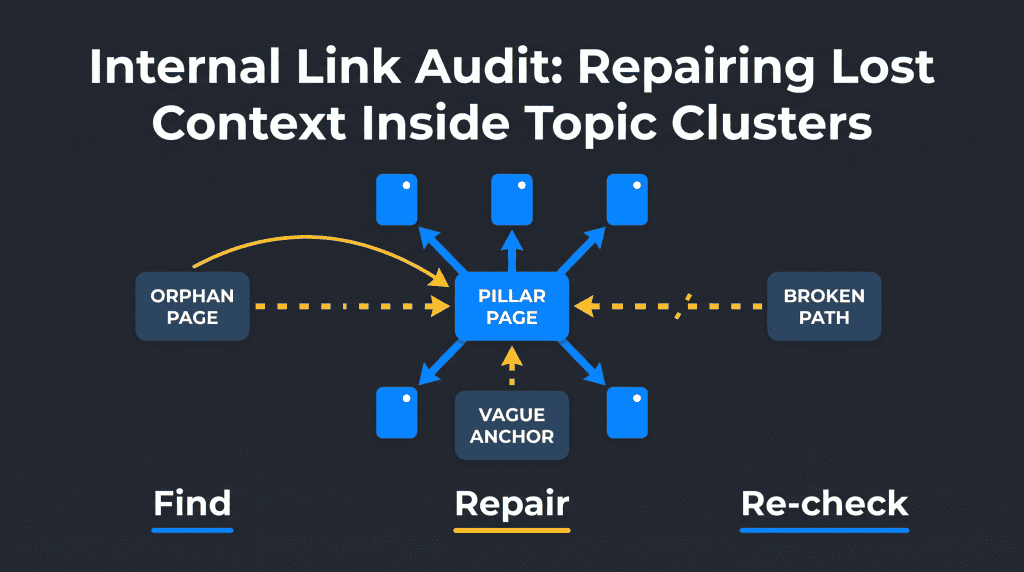
Summary: Audit one cluster at a time. Find orphan pages, broken paths, weak link distribution and vague anchors, then record the smallest repair that helps the reader reach the right next page.
Related Reads:
Mastering Internal Linking for SEO · Content Optimization Workflow · The Semantic Debt Audit · How to Write Content for AI Search · Entity SEO Guide
Bottom line: an internal link audit is useful when it leads to a documented decision. Do not simply add more links. Check whether an important page is easy to reach, whether the anchor text describes the destination, and whether the link helps a real reader continue their task.
What Is an Internal Link Audit?
An internal link takes a visitor from one page to another page on the same website. An internal link audit reviews those connections to find pages that are hard to discover, links that are broken, anchors that do not explain the destination, and cluster relationships that no longer make sense.
Internal links help people navigate a site. They also help a search engine discover pages and understand relationships between them. Google recommends using crawlable `<a href>` links and making important pages reachable from other relevant pages.
Internal links vs. external links
An internal link stays inside your website. An external link sends the reader to another domain. Both can be useful, but they solve different jobs. Internal links guide a reader through your own explanation, product information, documentation, or next step. A backlink is an external site linking to yours; it is not part of this audit.
Types of internal links to include in the audit
Review four common link types separately: navigation links in menus, contextual links inside the main content, breadcrumb links that show hierarchy, and footer links for secondary routes. They all count as internal links, but they do not carry the same reader context. A contextual in-content link usually explains why the destination matters at that moment.
Why internal links matter for SEO
A useful internal linking structure gives important pages more than one path from the homepage. It can also give a reader a relevant next step after a section of content. The goal is not a magic number of links. The goal is a clear route that supports the reader and makes the page’s role easier to understand.
What Is Internal Link Decay?
Internal link decay happens when an existing link loses its useful context. The link may still return a valid page, but its anchor is vague, its destination has changed, its source no longer fits the target topic, or the cluster has grown without the link structure changing.
For example, an old article may link to a product page with the anchor “learn more.” The link works. But it does not tell the reader what they will learn, and it may no longer answer the question raised in the paragraph. Another common case is a new pillar page that never receives links from the supporting articles it should organize.
Common signs of context decay
Look for these patterns before you start changing links:
| Sign | What it may mean | First check |
| Important page has few relevant inlinks | The page may be hard to discover from its own cluster | Check the pillar page and related articles |
| Anchor says “click here” or “read more” | The link gives little context | Read the sentence before and after the link |
| Source and target answer unrelated questions | The relationship may be historical rather than useful | Identify the reader question on both pages |
| Link points through several redirects | The original destination may no longer be current | Confirm the final page and replace the URL when needed |
| Page appears only in navigation | The page may be technically reachable but editorially unsupported | Find a contextual, in-content route |
Orphan pages and weakly integrated pages
An orphan page has no internal links pointing to it. It can still appear in an XML sitemap, receive external links, or be indexed. That does not mean it is integrated into the site’s internal linking structure.
A weakly integrated page is different. It has one or more internal links, but they may sit only in menus, use vague anchors, or come from unrelated pages. Treat both cases as audit findings, but do not repair them in the same way.
Prepare a Focused Internal Link Audit
Start with one topic cluster, not the whole site. A focused audit is easier to explain, test and repeat. Choose a pillar page, the supporting articles, and any product, guide or resource page that the cluster should help readers reach.
Start with a link inventory and cluster map
List the URLs in the cluster. For each page, record its main reader question, cluster role and important destinations. You can gather page URLs from your CMS, a crawl, Google Search Console and a sitemap. A sitemap is a useful discovery source, but it is not proof that a page is connected in a helpful way.
Check crawl depth and navigation routes
Crawl depth is the number of link steps from a starting page, often the homepage. A deep page is not automatically a problem. But an important page that can be reached only through many unclear steps deserves a review.
Ask a simple question: if a visitor starts on the relevant pillar page, can they reach this page through a meaningful next step? Then ask the same question from the viewpoint of a search crawler following ordinary HTML links.
Create a Context Decay Ledger
A ledger prevents a large audit from turning into random edits. Record evidence before changing a link. This also separates a real issue from a personal preference.
| Source URL | Target URL | Current anchor | Reader question | Finding | Next action |
| Supporting article | Pillar page | “this guide” | Where is the main explanation? | Anchor gives no topic context | Replace with descriptive anchor |
| Old guide | Updated resource | Old feature name | Is this information current? | Target changed and redirects twice | Update direct destination |
| Pillar page | Supporting article | No link | How do I complete this step? | Useful subtopic is missing | Add contextual in-content link |
The Seven-Step Internal Link Audit
An audit checks the current structure. Implementation is the later work of changing, adding or removing links. Keep those stages separate: first collect evidence, then approve a small repair list, then verify the implementation.
A strong audit follows a repeatable order. Start with the pages that matter, then inspect link paths, anchors and context. Do not make all changes at once.
1. Find orphan pages and pages with too few relevant internal links
Compare your crawl or CMS inventory with the pages that receive internal links. Flag pages with zero internal links first. Then review important pages that receive links only from a navigation menu or unrelated content.
A low number of links is not enough evidence on its own. A short policy page may need few links. A pillar page or important product explanation usually needs clear contextual support from related pages.
2. Find broken internal links, redirect chains and dead destinations
Also confirm that important links are visible to a crawler. A link that appears only after a complex interaction, or is not a normal HTML anchor, can be harder for search systems to discover. Test the rendered page and the link destination before treating the route as complete.
Broken internal links create a poor reader experience and waste a useful route through the cluster. Fix links to 4xx pages first. Then check long redirect chains and destinations that no longer match the source page.
When a page was permanently replaced, link directly to the current equivalent instead of relying on a redirect. Do not redirect every removed page to the homepage. Choose the closest useful destination or remove the outdated reference.
3. Review link distribution and important pages
Link equity is the practical idea that internal links can help direct attention and ranking signals toward pages you consider important. You cannot see Google’s exact calculation, so use it as a planning concept, not a score to chase. Compare internal link counts, source-page relevance and the page’s role in the cluster.
Check which pages receive most internal links. This shows the current internal linking structure, not necessarily the structure you intended. A popular archive page may receive many links while a core guide receives very few.
Mark pages as pillar, supporting, conversion, documentation, or reference. Then ask whether their internal link distribution matches that role. The answer should lead to a small repair list, not a demand to give every page the same number of links.
4. Review anchor text for clarity and false context
First export or review your repeated anchors. Flag vague phrases, anchors that promise a different answer from the destination, and one exact-match phrase repeated across unrelated pages. The purpose is clarity, not keyword density.
Anchor text is the clickable text of a link. Good anchor text tells the reader what they will find. It should be descriptive and natural, not repetitive or forced.
Replace vague anchors when the surrounding sentence can name the destination clearly. Avoid changing every link to an exact-match phrase. Repeated identical anchors can make prose awkward and may create a misleading impression that different pages answer the same question.
5. Check whether pillar pages and supporting articles link both ways
A topic cluster often works best when the pillar page links to useful supporting articles and the supporting articles link back when the reader needs the broader explanation. The links do not have to be symmetrical. They should have a reason.
Review whether a reader can move from the overview to a detailed answer and back to a related decision. This is where context decay often appears after new content is added but older pages are not updated.
6. Find contextual link opportunities without forcing links
For each target page, search the cluster for an existing sentence that already introduces its topic. This is safer than inserting a new keyword-heavy sentence just to create an internal link. Record the source page, suggested anchor text and reason in the ledger before publishing the change.
Look for a sentence that naturally raises a question answered by another existing page. Add a link only when the target expands the explanation, offers a necessary next step, or defines an important term.
Do not add a link just because two pages share a keyword. A contextual link should help the current reader. If the sentence does not support the target naturally, consider updating the source paragraph first or leave the link out.
7. Prioritise repairs by impact and effort
Before you prioritise, separate a technical error from a contextual opportunity. A broken link needs a repair. A page with low internal link counts needs an editorial judgement: it may be under-supported, or it may not deserve a larger role. This distinction keeps the audit focused.
Use three questions to choose the first fixes: does the problem affect an important page, does it block a reader or crawler path, and can it be repaired safely now? A broken link to a core page is usually higher priority than a minor anchor variation in an old post.
| Priority | Typical finding | Safe response |
| High | Broken link, orphan core page, wrong redirect | Repair or replace after confirming the intended destination |
| Medium | Pillar page lacks supporting links, vague anchor on high-value page | Add or revise one contextual link with an evidence note |
| Low | Minor wording variation, low-value archive relationship | Record for the next scheduled review |
Use Audit Tools and Data Sources in the Right Order
You can complete a small audit with a CMS export, browser checks, Google Search Console, an XML sitemap and a simple spreadsheet. For a large site, a website crawler can speed up the work by identifying broken links, redirects, crawl depth and internal link counts. The tool produces a list; your team still decides whether a suggested link improves the reader journey.
Compare crawl data with the content inventory
A crawl can show a URL that has no internal links or sits several steps from the homepage. Compare that result with the inventory. A page may be intentionally isolated, such as a confirmation page. A core guide, product explanation or pillar page usually needs a reasoned path from its related content.
Turn link opportunities into approved actions
An internal-linking opportunity is not automatically a change request. Review the source paragraph, destination, suggested anchor and reader question. Approve only opportunities where the source naturally introduces the target topic. This keeps implementation useful rather than mechanical.
How to Measure an Internal Link Audit
Measure the quality of the repair process before you look for a business outcome. Track the number of broken routes fixed, high-priority pages with a clear contextual path, orphan pages reviewed, and approved changes completed. Then re-crawl the affected cluster to confirm the structure changed as intended.
Do not report a link count alone as success. A useful result combines three checks: the target page is reachable, the anchor is accurate, and the link helps a reader continue the task. Search performance may change for many reasons, so treat ranking or traffic changes as observations rather than proof from one audit.
Internal Link Audit Template: From Finding to Follow-Up
Use a compact template for every internal linking issue: issue type, source page, destination page, current anchor, proposed action, reason, owner, implementation date and follow-up result. This makes the audit repeatable and gives the next reviewer enough context to understand the decision.
Common issue types include broken links, redirect chains, orphan pages, poor crawl depth, weak internal link distribution, vague anchor text, irrelevant links and missed contextual opportunities. Do not mark an issue complete until the rendered page, the destination and the reader context have been checked.
Fix Internal Link Decay Without Creating New Problems
The smallest correct repair is usually better than a site-wide replacement. Preserve the source page’s meaning, keep the anchor readable, and confirm that the target delivers what the link promises.
Correct, remove, replace or add a link
Correct a link when its anchor or destination is inaccurate. Remove it when the old reference no longer helps the reader. Replace it when a newer page answers the same question better. Add one when a relevant reader path is missing.
Keep a change log with the source URL, target URL, reason, owner and review date. A change log helps the team understand why a link was added and prevents the same issue from returning after the next redesign.
Keep links crawlable and useful to people
Use ordinary HTML links that point to the intended destination. Avoid hiding important routes behind interaction-only buttons or relying only on a sitemap. Google’s documentation explains that links generally need an `href` attribute to be reliably parsed and discovered.
Re-check after updates
After implementation, re-crawl the affected pages and compare the new internal linking structure with the original audit. Check the source page in a browser, confirm the link uses the intended URL, and note whether the target now has a meaningful route from the cluster. This follow-up turns a list of links into a completed audit cycle.
After a repair, re-crawl the affected pages or check them in your CMS. Confirm that the link works, the anchor is clear, and the target still has the expected role. Do not claim a ranking improvement from one edit. Treat the change as a documented improvement to the site structure.
Common Internal Link Audit Mistakes
An audit becomes less useful when teams confuse a technical count with a meaningful relationship.
Ignoring navigation and breadcrumbs
Navigation links and breadcrumbs help visitors understand where they are. Audit them as part of the internal linking structure, but do not assume they replace a contextual link inside relevant content. A reader may need both a hierarchy path and a next step that explains why a supporting article matters.
Treating a sitemap as proof of integration
A sitemap can help a search engine discover URLs, but it does not show that a reader can find them through a useful topic path. Review contextual links separately.
Adding exact-match anchors everywhere
Exact-match anchor text can be clear in the right sentence, but repetition makes content harder to read. Use the words that naturally describe the destination.
Fixing link counts without checking the reader journey
A page can have many links and still be hard to understand or reach from the relevant cluster. Read the surrounding paragraph before treating a count as a success.
A Simple Monthly Internal Linking Review
A monthly review is enough for many content teams. Review new articles, high-priority repairs, changed product pages and any cluster that has recently expanded. Keep the audit small: one cluster, one owner and one short decision list.
NEURONwriter can help after the audit identifies a real gap. Use it to research a needed update or clarify a supporting article. Do not use it to generate links without first deciding whether the relationship helps the reader.
Frequently Asked Questions About Internal Link Audits
What is an internal link audit?
An internal link audit checks links between pages on the same website. It identifies issues such as orphan pages, broken links, unclear anchors, deep pages and missing connections inside a topic cluster.
Do internal links help SEO?
Yes. Internal links help visitors navigate and help search engines discover pages and understand relationships between them. Their value depends on whether the links are crawlable, relevant and useful to the reader.
What is an orphan page?
An orphan page has no internal links pointing to it. It may still exist in a sitemap or receive external visits, but it lacks a route from the rest of the website’s internal linking structure.
How often should I run an internal link audit?
Run a focused audit when you add a major topic cluster, redesign navigation, remove pages or publish many new articles. For an established site, a small monthly review and a broader quarterly audit are practical starting points.
How many internal links should a page have?
There is no universal number. A page needs enough relevant links to be discoverable and useful in its cluster. Judge the role of the page and the reader journey rather than aiming for a fixed count.
What is good anchor text for an internal link?
Good anchor text describes the destination in natural language. It should make sense in the source sentence and help the reader predict what they will find after clicking.
What is the difference between an internal link audit and a backlink audit?
An internal link audit reviews links within your own site. A backlink audit reviews links from other websites to yours. They use different data and solve different problems.
Can I do an internal link audit without a paid tool?
Yes. You can start with a CMS export, sitemap, browser checks and Google Search Console. A crawler can save time on a larger site, but the important work is still deciding whether each link supports a useful page relationship.
Do navigation links count as internal links?
Yes, but navigation links do not replace contextual links in the main content. A page that appears only in navigation may still need a relevant editorial path from its topic cluster.