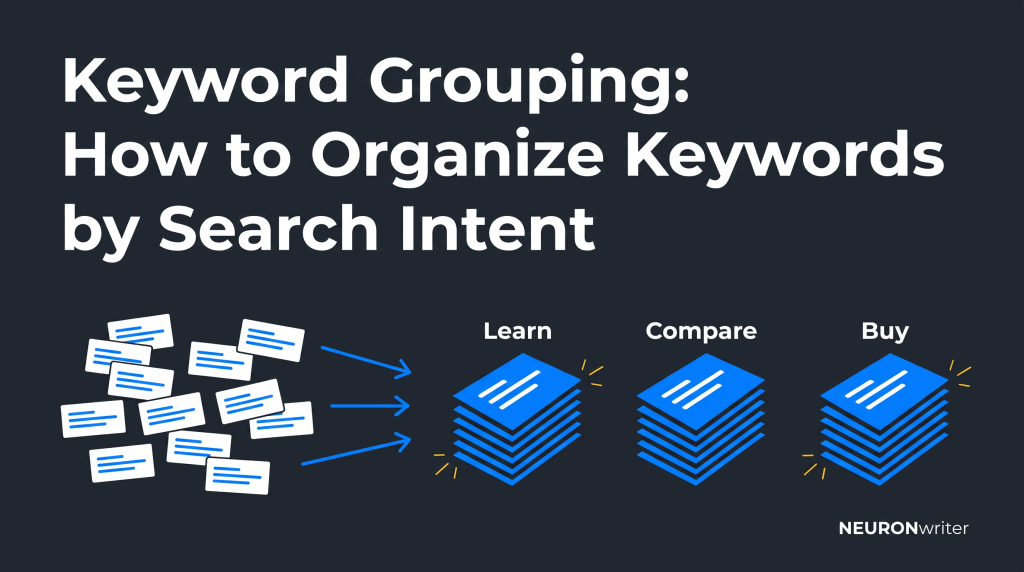
Keyword Grouping: How to Organize Keywords by Search Intent
Semantic Summary
Idea: Keyword grouping organizes search phrases around shared topics and user goals, helping you decide which terms belong on the same page.
Challenge: Similar wording does not always mean similar needs. Grouping everything by a shared word can produce unfocused pages or several articles answering the same question.
Summary: Start with a clean list, build broad topic groups, separate different search intentions, check the results, and assign each validated group to an existing or planned page.
Related Reads: Content Map for Customer Intent: Intent Mapping Guide · Using NEURONwriter to Map and Dominate Entity Clusters
What Is Keyword Grouping?
Keyword grouping is the process of sorting search terms into meaningful sets. For search engine optimization (SEO), the useful question is not simply whether words look alike: it is whether one page can help the people searching for them.
For example, “how to wash running shoes” and “cleaning running shoes” could belong together. “Buy running shoes” probably needs a different page. These are illustrative decisions, not claims about today’s live results for those phrases.
A broad keyword group might describe a whole subject, such as running shoes. Before writing, split that subject into smaller groups with clear purposes. Understanding keyword grouping means recognizing that a topic label is not automatically a page brief.
Keyword Grouping vs. Keyword Clustering
Keyword grouping and keyword clustering are often used interchangeably. Some practitioners use “grouping” for organizing a list and “clustering” for checking which terms share ranking pages. There is no single naming convention that every tool follows.
In this guide, a keyword cluster means a set of queries you have checked and plan to address on one page. Topical clustering is a different level: organizing several connected pages around a broader subject.
The practical difference between keyword organization and page planning matters more than the label. You can group related terms for research without deciding that they all need one article.
Benefits of Keyword Grouping for SEO
Keyword grouping helps turn a long list into specific writing and updating decisions. Its value comes from clearer page boundaries, not from adding more phrases to a paragraph.
The main benefits of keyword grouping are easier prioritization, fewer repetitive briefs, and better visibility into unanswered questions. Instead of planning one page per keyword, you can give closely related searches one useful destination.
This also helps reduce unnecessary overlap, sometimes known as keyword cannibalization. However, two pages appearing for the same query is not automatically a problem: check whether they meet different needs before merging anything.
Google’s SEO Starter Guide explains that people search using different wording and that its language-matching systems can connect pages with queries even when every exact variation is not present. Use keywords to understand the answer people need, not to build a repetition checklist.
| What you find | Likely decision | What to verify |
| Different wording, same question | Consider one page | The same answer and format help both searchers |
| A buying query and a care question | Usually separate pages | Product listings versus instructions in the results |
| A broad subject with several distinct tasks | Keep one research group; plan smaller page groups | Which tasks need their own complete answer |
| Mixed or changing results | Leave the decision open | Recheck the market, page types, and representative terms |
| An existing page already answers the group | Review and improve that page first | Whether a new URL would add a genuinely different benefit |
How to Implement Keyword Grouping: A Step-by-Step Process
Start with a manageable subject, then move from broad organization to page-level decisions. The output should be a table that shows what you will publish, update, or leave for later.
1. Build and Clean Your Keyword List
Collect a list of keywords from actual audience questions, existing site data, and keyword research. For a first exercise, choose one product line or service rather than your full website.
Google Search Console is a free source of queries already bringing impressions or clicks to a verified site. Its Performance report supports query and page views, country and device dimensions, and exports. It reflects your current visibility, not every opportunity in the market.
A keyword research tool can help expand an initial list. Google Keyword Planner provides ideas and search estimates; Google’s access guidance currently requires completed account setup, including billing information, for basic idea features. If you do not want that setup, start with Search Console and questions from customers.
Remove exact duplicates, irrelevant locations, and terms outside your offering. Keep the original wording alongside any cleaned version. Record the source, country, language, and collection date so keyword data from different markets does not get mixed accidentally.
Do not delete useful long-tail keywords just because they have little reported volume. A specific question may expose a missing answer that a broad term hides.
2. Create Broad Topic Groups
First, group keywords based on their subject. This creates a useful sorting layer, not your final list of pages.
For a running-shoe shop, initial labels might be choosing shoes, shoe care, sizing, and buying. Put ambiguous terms in a “review” group instead of forcing a match.
Keep group names consistent. If one label is “shoe cleaning,” do not create another called “cleaning footwear” unless the distinction is meaningful. Creating keyword groups works better when you can explain each boundary in one sentence.
For an extensive keyword set, a first pass can be automated. Still, review the grouping logic: a list organized by shared words can miss synonyms or combine unrelated questions.
3. Group Keywords by Search Intent
Separate terms according to the action the searcher wants to complete. Search intent means the purpose behind a query, such as learning, comparing, buying, or finding a particular website.
“Best running shoes for beginners” suggests comparison. “How to clean running shoes” suggests instructions. The shared product name does not make these the same task.
Broad intent labels are only the start. Two informational searches may still need different answers: cleaning shoes and choosing the right size are both educational, but not one focused article.
Semantic keyword grouping looks at meaning rather than only matching text. It can connect different expressions of the same need. It cannot remove the need to check whether your proposed page actually answers that need.
4. Check the SERP Before Combining Keywords
Compare the search engine results page, or SERP, for representative terms in each proposed group. Look for repeated pages, similar formats, and the same underlying task.
Use the same target country and language. Where relevant, compare the same device type. Record what you observed and when, because search results can vary.
Repeated URLs are useful evidence, but not an automatic verdict. Two searches can share several results while still differing in an important requirement. Open the pages and check what they actually provide.
For a small manual comparison, record the first several organic URLs for each term and mark the shared ones. Compare exact pages rather than counting any result from the same domain as a match. Exclude advertisements from this comparison.
A shared SERP result supports keeping terms together; different page types support separating them. Avoid treating a fixed overlap threshold as a Google rule. Thresholds in grouping tools are settings, not guarantees about what your site will rank for.
5. Map Each Validated Keyword Group to a Page
Choose one intended destination for each page-level group, then check your existing content before creating a new URL. Keyword mapping is the record of that assignment.
Select a primary phrase that accurately describes the task and the page format. Other related keywords can guide useful sections, examples, and questions. The highest-volume term is not always the best fit.
For illustration, the following sheet shows how an initial subject can become distinct page plans. The example paths are proposed paths, not published URLs or measured ranking results.
| Group | Representative terms | User task | Format | Destination or action |
| Care | how to wash running shoes; cleaning running shoes | Clean shoes safely | Step-by-step guide | Review existing care guide; otherwise plan /clean-running-shoes/ |
| Choosing | best running shoes for beginners; beginner running shoe guide | Compare suitable options | Buying guide | Check the SERP and existing guides before planning a new page |
| Buying | buy running shoes; running shoes online | Browse products | Category page | Improve the relevant shop category, not a duplicate blog post |
Add an owner, review date, and short explanation for uncertain assignments. Check nearby groups for duplication before approving the map.
Plan internal links based on keyword group relationships and the next useful step for the reader. A care guide may link to a relevant product category, but the link does not mean those pages should target the same task.
6. Turn the Group into a Focused Brief
Write one sentence describing what the reader should be able to do afterward. Then list the evidence, examples, and sections needed to support that outcome.
For the care guide, that might mean cleaning steps, material warnings, drying advice, and when to follow the manufacturer’s instructions. Do not add a long buying comparison just because it contains the same product words.
A useful brief includes the main phrase, supporting questions, page type, existing destination, and exclusions. Integrate it into your content optimization workflow so grouped terms lead to a reviewed article rather than an unchecked draft.
Manual Keyword Grouping vs. Grouping Tools
Manual keyword grouping offers direct control over a small list. Automation helps process thousands of keywords, but the method matters more than the size of the output.
| Method | Useful for | Main limitation |
| Spreadsheet and human review | Small, focused lists and explaining decisions | Time-consuming at scale |
| Shared-word matching | Quick preliminary sorting | Misses synonyms and may mix different needs |
| Meaning-based grouping | Finding related ideas expressed differently | Similar meaning does not prove one-page suitability |
| SERP-based grouping | Checking whether the same pages appear for different terms | Depends on current results, market, and chosen settings |
A keyword grouping tool should make its method clear and let you inspect the output. Before pasting keywords into the tool, check accepted formats, data handling, language coverage, and export options.
If you use a keyword grouper, keep uncertain assignments visible. A dedicated clustering tool may offer more SERP comparisons, but that does not make every suggested group correct.
The best keyword grouping tool for your workflow is one whose output you can verify. Test a small sample containing obvious matches, obvious non-matches, and difficult cases before relying on a large run.
Does the Same Approach Work for SEO and PPC?
The organizing principle is similar, but the destinations differ. SEO groups help plan organic pages; pay-per-click (PPC) groups help organize relevant advertising messages and landing pages.
A keyword group built for a care article is not automatically a useful ad group for selling shoes. Do not copy the full keyword plan between channels without reviewing the commercial goal and relevance. This guide focuses on organic content strategies, not campaign setup or bidding.
How NEURONwriter Helps Turn Keyword Groups into Content
NEURONwriter can support research, outlines, and writing after you have reviewed the group. Use these named features for their specific jobs, rather than assuming one SEO tool should decide every page boundary.
- Competitors Structure: inspect the headings and organization of analyzed pages to see which sections match your intended task.
- People Also Ask: review related questions when they are available and select the ones that belong in the same answer. Both research features are described on the Content Ideas page.
- Content Designer: generate a proposed title, description, and heading structure, then edit it against the validated brief. See the official Content Designer features.
- NLP Terms: use the recommendations in Content Writer to check topic coverage while drafting. Explain the relevant concepts naturally instead of inserting every suggested phrase.
These functions help with the next stages; they do not prove that every term belongs on one URL. A Content Score is an optimization reference, not a search engine ranking prediction or a guarantee of AI citations.
Common Keyword Grouping Mistakes
The biggest mistake is treating an automatically generated group as a publishing instruction. Check the user task, existing pages, and business relevance before producing content.
Grouping by a shared word alone: keyword matching is useful for sorting, but “shoe sizes” and “shoe cleaning” are not the same question.
Creating another page without checking the site: review whether an existing keyword group already has a useful destination. Updating it may be better than writing a near-duplicate.
Adding search volumes as a traffic forecast: estimates for close variants may overlap, and not every search becomes a visit. Use the numbers as context, not a promised audience.
Trying to include every keyword: keep genuinely useful variations, but leave out irrelevant terms. One well-answered question matters more than a long phrase list.
Making an unrelated group look important: ask whether the keyword is relevant to your customers and offering. Search volume alone cannot make an off-topic page useful.
How to Measure and Update Keyword Groups
Review whether the intended page attracts relevant queries and helps readers complete the task. Start with a baseline rather than assuming that every post-publication change came from grouping.
In Search Console, inspect queries for the page and compare clicks, impressions, click-through rate, and average position over comparable periods. Use the same country and device filters. Average position is not one fixed ranking.
Track useful actions such as enquiries or purchases separately. Avoid counting repeated page-level query data as distinct people, and account for seasonality or other content changes.
Update your keyword groups when new questions appear, the product changes, or the results shift. A scheduled quarterly review is a practical starting point, not a requirement from Google.
Keyword grouping makes priorities easier to explain, but publication still requires crawlable, indexable pages and helpful internal navigation. Share a genuinely useful example with your audience or an industry community; do not present promotion as a guaranteed ranking or citation tactic.
FAQ
What is an example of keyword grouping?
“How to wash running shoes” and “cleaning running shoes” could form a care group because they describe a similar task. “Buy running shoes” belongs in a buying group. Check current results before using these illustrative assignments on a real site.
What are the different categories of keywords?
You can organize terms by topic, user purpose, location, or stage in a decision. Common intent categories include informational, navigational, commercial, and transactional. For page planning, narrow these broad labels to the specific task the page must answer.
How many keywords should be in a group?
There is no universal minimum or maximum. A group of keywords should stay together only while one focused answer can meet the shared need. Do not split a useful group merely to match an arbitrary count.
Can the same keyword belong to multiple groups?
Yes, a broad term may appear in several research categories. For page-level targeting, record one primary intended destination where that is appropriate, and explain any exception. Using the same keyword naturally on several pages does not by itself prove harmful overlap.
Can I group keywords without a paid tool?
Yes. A spreadsheet, customer questions, and Search Console exports are enough to begin a small project. Free keyword grouping options can speed up sorting, but manually grouping a sample first makes their limitations easier to spot.
How does a SERP-based keyword clustering tool work?
It compares the pages appearing for different queries and proposes groups based on shared results. Keyword clustering takes this evidence beyond simple wording similarity. Review the settings and page content because overlap alone does not settle every decision.
When should I put keywords on separate pages?
Separate them when users need substantially different answers, formats, or actions. Compare representative results and inspect the pages themselves. Avoid keyword cannibalization by checking existing content before creating either destination, not by banning all repeated vocabulary.
How often should I review keyword groups?
Review important groups when customer needs, your offering, or the search results change. A quarterly check can help maintain the plan, with more frequent reviews for fast-moving subjects. Keep dated notes so regrouping decisions have a clear reason.
Does keyword grouping guarantee higher rankings?
No. Keyword grouping doesn’t replace useful content, reliable evidence, technical accessibility, or competition analysis. It improves the planning process, but search engines decide which pages to show and performance must be measured.