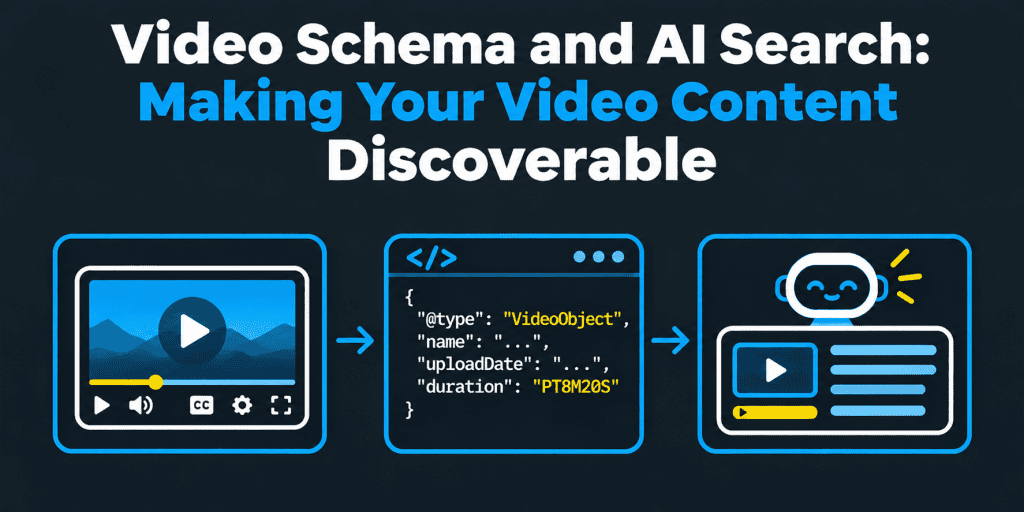
Video Schema and AI Search: Making Your Video Content Discoverable
Semantic Summary
Idea: Video schema is VideoObject markup that describes a video on a page: its title, thumbnail, upload date, and more. It helps search engines understand and index videos, and it can make a page eligible for video features in Google.
Challenge: AI tools cannot watch every video. No one has published how assistants use video markup, so guides that promise AI visibility from code alone are guessing.
Summary: Put each video on a page built around it, mark it up accurately, add a transcript and clear text, test the markup, and check what AI answers say about your videos.
Related reads: Video Transcript SEO · Schema Markup for AI Agents: The 5 Tags You Need · AI Visibility Experiment Design
Video schema is structured data, usually VideoObject in JSON-LD, that describes a video on a web page. Google documents three required properties: the name, the thumbnail URL, and the upload date.
It can help Google find and index your videos, and it can make a page eligible for video features such as key moments. For AI answers, no field-level evidence is published, so pair the markup with a clear page and a transcript. This guide is marketing advice, not a guarantee of results.
What is video schema markup?
Video schema markup labels the facts about a video so machines can read them without guessing. It uses the VideoObject type on schema.org.
A VideoObject can describe:
- Identity. The name and description of the video.
- Location. The video file or the embed URL.
- Timing. The upload date and the duration.
- Appearance. The thumbnail image.
- Structure. Clips or key moments inside the video.
The markup describes the video. It does not replace the video, and it does not play it.
Why does video schema matter?
Search engines cannot always tell what a video is from the player code alone. Markup removes the guesswork.
- Indexing. Valid markup helps Google find the video on the page.
- Eligibility. It can make a page eligible for video features in Google Search, as documented in Google’s video structured data guidance.
- Consistency. One structured description helps keep titles, dates, and thumbnails the same across your site.
Video schema is not a direct ranking factor, and it does not guarantee a rich result. Google decides what to show.
Does video schema help AI search?
There is no published evidence of how AI assistants use VideoObject fields. Some vendors claim that video markup helps AI answers. That is plausible, but nobody has shown which fields matter.
| Claim | Evidence | How to treat it |
| Valid VideoObject markup can make a page eligible for Google video features | Documented by Google | Follow the documentation |
| Video markup changes what AI assistants say | Not documented | Test it with your own prompts |
| Text on the page, such as a transcript and a clear description, helps tools understand a video | Plausible, since text is easy for machines to read | Prioritize it |
AI tools mostly work from text. A video with no transcript, no description, and no surrounding copy gives them little to use. Our guide to video transcript SEO shows how to turn spoken words into a useful page. Our guide to AI visibility experiment design shows how to test one change at a time.
Which VideoObject properties are required?
Google lists three required properties for video features. Other properties are recommended. Treat this table as a direction, and confirm the details in the current documentation.
| Property | Status | Notes |
| name | Required | Use a title that is unique to this video on your site |
| thumbnailUrl | Required | A crawlable image URL for the thumbnail |
| uploadDate | Required | Use ISO 8601, with the time zone |
| description | Recommended | Match the visible description |
| contentUrl or embedUrl | Recommended | Point to the video file or the player embed |
| duration | Recommended | Use ISO 8601, for example PT3M20S |
| expires, regionsAllowed | Optional | Use only if the video really expires or is limited by region |
| interactionStatistic | Optional | Use only accurate, current view counts |
What does a VideoObject JSON-LD example look like?
Here is a simplified example with placeholder values. It shows the structure, not a complete or required set of fields.
<script type=”application/ld+json”>
{
“@context”: “https://schema.org”,
“@type”: “VideoObject”,
“name”: “How to reset the example device”,
“description”: “A short walkthrough of resetting the example device.”,
“thumbnailUrl”: [“https://example.com/thumbs/reset-device-16×9.jpg”],
“uploadDate”: “2026-03-14T09:00:00+00:00”,
“duration”: “PT3M20S”,
“contentUrl”: “https://example.com/videos/reset-device.mp4”,
“embedUrl”: “https://example.com/embed/reset-device”
}
</script>
Every value must match the visible page and the real video. Use real dates, real URLs, and a real thumbnail.
What makes a page ready for video indexing?
Markup alone is not enough. As Google describes it, the page and the video must also be usable.
- A page built around the video. The video should be a main part of the page, not hidden among other elements.
- A watchable video. Markup must sit on a page where users can watch the video.
- A valid thumbnail. Use a stable, crawlable image URL.
- A crawlable player or file. Google detects videos in elements such as video, embed, iframe, and object.
- Unique page details. Give each video page its own title and description.
- Access. If the video is behind a paywall, follow Google’s paywall guidance.
Google’s video indexing report in Search Console shows which pages contain an indexed video and why some are not indexed.
How do Clip and SeekToAction add key moments?
Key moments let people jump to a part of a video from search results. Google describes two ways to supply them.
- Clip. You list each segment yourself, with a name, a start time, an end time, and a URL.
- SeekToAction. You tell Google how your URLs encode a timestamp, so it can find key moments itself.
Google sets conditions. As reported from its documentation, the video should be long enough for key moments, and your page must be able to link to a point other than the start. Check the current documentation before you implement either one.
Neither type is a ranking factor. They add a possible search feature, and they depend on a well-built video page.
Does video schema work for videos hosted on YouTube?
Yes, for the page on your own site that embeds the video. The markup describes the video on your page, and your page URL is the one to mark up. YouTube handles its own watch page separately.
- Embedded YouTube videos. Add VideoObject markup to your page and point embedUrl to the player.
- YouTube alone. If you only publish on YouTube, you do not control page markup. Focus on the title, description, chapters, and transcript there.
- Both. Keep titles and descriptions consistent between YouTube and your page.
Our guide to YouTube SEO covers the platform side, and our post on video SEO vs. blog content explains when to use each format.
How do you add video schema to your website?
Choose the method that keeps data accurate at scale.
- Check what you already have. Many players, themes, and plugins output some markup. View the page source.
- Prefer generation from your video data. A template that reads your video library avoids drift.
- Use one source. Do not combine a plugin and hand-written JSON-LD on the same page.
- Place the JSON-LD in the page. Put it in the head or the body of the page that contains the video.
- Review the output. Defaults can be incomplete or wrong.
- Test and monitor. Validate before launch and review errors after.
Some teams add markup through a tag manager. That can work, but check that the markup appears in the rendered page and matches the visible content.
How NEURONwriter helps: NEURONwriter Generate Schema Markup option creates JSON-LD from page content, but its FAQ names Blog, HowTo, Review, Product, and FAQ as examples and does not list VideoObject. Check the type list in your editor. If VideoObject is not offered, use your video platform, plugin, or a template filled from your video data. The AI Readiness audit can still check whether structured data is present on a video page.
Can you mark up several videos on one page?
Yes, when the page really contains several videos. Describe each video as its own VideoObject, with its own name, thumbnail, and date.
Be careful with pages that list many videos. If each video deserves to be found, give it its own page with its own title, description, and transcript. A single gallery page with dozens of videos rarely helps any of them.
If the video sits inside an article, you can describe it within the article’s markup or as a separate block. Choose one clear approach, and keep it consistent across templates.
How do you build a video page that works for people and machines?
The page matters as much as the markup. Build it around what a viewer needs.
- Lead with a clear title and summary. Say what the video shows in one or two sentences.
- Add a transcript. Edit it into readable text with headings, not a wall of words.
- Add chapters or a timeline. Link to timestamps where useful.
- Describe visuals. Add text for anything that appears only on screen.
- Add related links. Point to the next step, product, or guide.
- Add captions. They help accessibility and give machines text.
Our multimodal SEO guide and our post on image SEO for AI vision models explain how search systems read more than text.
How NEURONwriter helps: for a video topic, YouTube Ideas in NEURONwriter’s content ideas can suggest video topics for your keyword, and the SERP analysis shows the headings, terms, and People Also Ask questions that top pages cover. Content Designer can extract facts from your own documents or notes into an editable form, and Neuro runs short commands such as adding an FAQ section or shortening a summary. The score measures topical coverage, not whether the video or the markup is correct.
Which video formats and elements should you use?
Use formats that browsers and players support widely, and elements that crawlers can detect.
- Video elements. The HTML video element, with source and track children for files and captions.
- Embeds. An iframe or embed from a video platform, with a clear title.
- File format. MP4 is widely supported. Check browser support for any other format you use.
- Poster image. Use a poster or thumbnail that matches the one in your markup.
- Performance. Do not let large video files slow the page. Load them efficiently.
How do you test and validate video schema?
Test before and after launch.
- Run the Rich Results Test. Use Google’s Rich Results Test to check eligibility and errors.
- Validate the syntax. Use the Schema Markup Validator for general schema.org checks.
- Check the video indexing report. Review the report in Search Console for indexed videos and reasons for exclusion.
- Fix the cause. Change the template or the data, not just one page.
- Retest after changes. Player and theme updates can break markup.
Common errors include a missing thumbnail, a date without a time zone, a duration in the wrong format, and a mismatch between the page and the markup. There is no fixed time for Google to recognize new markup, so check the reports instead of assuming.
How do you monitor what AI says about your videos?
Test AI answers for the questions your videos answer.
- Write prompts. Use how-to and product questions that your audience asks.
- Run them across engines. Use the same prompts each time.
- Log results. Note whether your page or video is cited, and whether the description is correct.
- Fix errors at the source. Update the page, transcript, or listing that holds the wrong fact.
Engines differ, as we explain in why AI engines cite different sources. Our citation-checking checklist explains the method.
How NEURONwriter helps: the AI Visibility module monitors the questions you add, called Monitored Discussions, across Google AI Overviews, Google AI Mode, ChatGPT, and Perplexity. Each discussion gets a visibility score from 0 to 100, a per-engine breakdown, and a sentiment tag. The Opportunities tab lists tasks such as “Earn mention” on pages AI already cites and “Optimize” for your own pages. It does not read your video files or your markup, so check those yourself.
Where does video schema fit with other schema types?
A video page can combine types when each describes the visible page. A tutorial page might use Article, BreadcrumbList, and VideoObject. A how-to page may also have steps. See our notes on HowTo schema, where Google no longer shows a rich result, to avoid expecting a feature that has been retired.
Other markup guides in this series cover Product schema, Review schema, and Event schema. Our overview of schema markup for AI agents shows how the types fit together.
What are the basics of video schema implementation at a glance?
This practical guide to video schema markup collects what to remember.
- Use the right type. VideoObject describes a video. Use it on pages where users can watch the video.
- Add the required properties. Include the name, thumbnail URL, and upload date.
- Use ISO 8601. Write dates and durations in that format, with the time zone for dates.
- Use JSON-LD where you can. It is usually easier to maintain than microdata.
- Keep thumbnails consistent. Use the same thumbnail wherever you declare it.
- Match the visible page. Do not mark up what viewers cannot see.
- Do not rely on markup alone. Build a clear page with a transcript.
Video markup adds machine-readable context to a page. It supports video SEO, but it does not replace a strong video and a helpful page.
What are the best practices for implementing video schema?
These best practices for video schema apply to any site, from a small blog to websites with large video libraries.
- Treat markup as part of search engine optimization, not a trick. Video markup supports SEO strategies, but search engine optimization still starts with a useful page and a good video.
- Implement video schema from one source. Whether you are adding schema markup by hand, with a schema generator, or through Google Tag Manager, keep one source and check the rendered page.
- Use JSON-LD. Using JSON-LD keeps the structured data markup separate from the page layout, and it is easier to update.
- Describe each embedded video. For a video embedded from a platform, describe the video on your page, and keep the details accurate.
- Give each video page a clear role. A video gallery can link to individual video pages, and each page can carry its own markup.
- Test in Google Search Console and the Google Rich Results Test. Use both tools together, and add the Schema Markup Validator for general syntax.
- Review the video search experience. Check how videos appear in Google search results, and whether the thumbnail and title match the page.
In the past, video rich snippets in Google search results often displayed a thumbnail beside a result. Today, what Google shows varies by query, device, and eligibility, so treat any video feature as a possible outcome. Implementing video schema markup is one type of structured data work, and it helps search engines like Google understand your video content in the same way across pages.
A short note on terms: schema markups, structured data, and video markup refer to the same idea here. Markup using JSON-LD makes the video details explicit, so the actual video is easier to find, and your content is easier to understand. It is a form of video marketing support, because it helps relevant video pages appear when people search. Make your content useful first, and then add markup that describes it accurately.
Common video schema mistakes
- Missing or broken thumbnails. Use a stable, crawlable image.
- Dates without a time zone. They cause wrong or invalid dates.
- Markup on pages without the video. Markup must sit where users can watch.
- Duplicate titles. Each video needs a unique name.
- Using several markup sources. Duplicate blocks conflict.
- Expecting AI visibility from code. No evidence supports that claim.
How does NEURONwriter help with video content and discovery?
NEURONwriter helps you plan video pages, write supporting text, check structured data presence, and watch how AI describes your content. It does not generate VideoObject markup unless your editor’s type list shows it, and it does not validate markup. Here is how it maps to the steps above.
- Plan the topic and the page. YouTube Ideas suggests video topics, and SERP analysis shows competitor headings, suggested terms, and related questions. The content editor and content score show whether a draft covers what top pages cover.
- Write and edit. Neuro runs short commands inside the editor, and Content Designer builds an outline with title, meta description, and headings.
- Check presence. AI Readiness checks whether structured data and AI crawler access are in place.
- Monitor AI answers. AI Visibility tracks Monitored Discussions across four AI engines, with visibility scores and sentiment.
- Act on gaps. Opportunities and Competitors point to tasks such as earning mentions and improving pages.
You can run a keyword analysis in NEURONwriter before you plan your next video page. Treat every score as a guide, because no tool can guarantee rich results or citations.
FAQ
What is video schema markup?
Video schema markup is structured data, usually VideoObject in JSON-LD, that describes a video on a page, including its name, thumbnail, upload date, and more.
What is VideoObject schema?
VideoObject is the schema.org type for a video. Google uses it to understand videos and, when a page is eligible, to show video features.
Which VideoObject properties are required?
Google lists the name, the thumbnail URL, and the upload date as required. Other properties, such as the description, content or embed URL, and duration, are recommended. Check the current documentation.
Does video schema guarantee rich results?
No. Valid markup can make a page eligible, but Google decides what to show.
Is video schema a ranking factor?
Not directly. It helps Google find and understand videos, and it can support eligibility for video features.
Does VideoObject schema work for videos hosted on YouTube?
Yes, for the page on your own site that embeds the video. Mark up your page, and point the embed URL to the player.
Can I add video schema markup to multiple videos on one page?
Yes, if the page contains several videos. Describe each as its own VideoObject, and consider separate pages for videos that deserve to be found.
Where do I put the JSON-LD?
Put it in the page that contains the video, in the head or the body. Make sure it appears in the rendered page and matches the visible content.
What is Clip structured data, and how does it differ from SeekToAction?
Clip lets you list each video segment with a name, start time, end time, and URL. SeekToAction tells Google how your URLs encode a timestamp, so it can find key moments itself.
Can Clip and SeekToAction markup improve my rankings?
They are not ranking factors. They can make key moments possible in search, if your page and video meet Google’s conditions.
How do I know if my video schema is working?
Run the Rich Results Test, validate the syntax, and review the video indexing report in Search Console. Also check what AI answers say about your video.
How long does it take for Google to recognize video schema markup?
There is no fixed time. It depends on crawling and indexing, so check Search Console.
Can I use AI to write my video schema?
You can use AI to draft it. Always verify every value against the real video and the page, and validate the result.
What happens if my video schema contains errors?
The page may not be eligible for video features, and wrong data can mislead search systems. Fix the template or the data and retest.
Will adding schema make my website slower?
JSON-LD adds a small block of text, so the effect is usually minor. Large video files and heavy players are a bigger risk to speed.
What video format is best for websites?
MP4 is widely supported. Many sites use a video platform embed instead of hosting files. Choose based on browser support and performance.
Is video schema important for social media such as TikTok or Instagram?
Markup applies to web pages. Social platforms use their own metadata. If you embed a social video on your site, you can describe it on your page.
What are examples of video content?
Tutorials, product demos, webinars, customer stories, explainers, interviews, and event recordings.