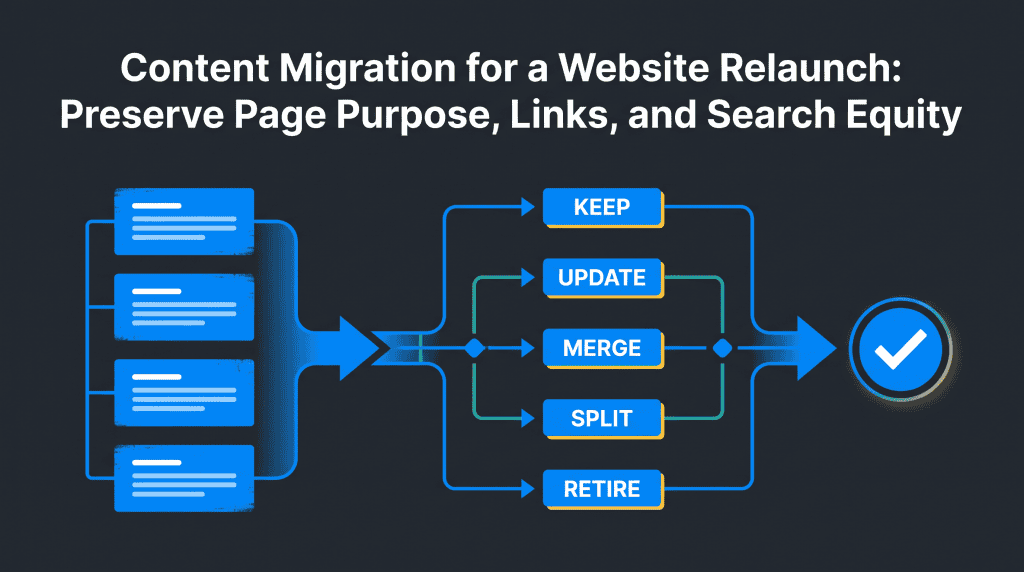
Content Migration for a Website Relaunch: Preserve Page Purpose, Links, and Search Equity
Semantic Summary
Idea: A website content migration is a chance to move the right information into a clearer new structure—not to copy every old page unchanged.
Challenge: During a relaunch, teams can lose useful pages, proof, context, and links when decisions are made from URL lists alone or too late in the process.
Summary: Inventory each source page, record its reader purpose, choose a destination action, map links and assets, assign an owner, and check the live result. Treat search visibility as something to protect and monitor, never as a guaranteed outcome.
Related Reads
- SEO for New Websites
- Content Pruning: A Guide to Removing Underperforming Content
- Content Governance in 2026
A website content migration is a planned move of existing pages and assets to a new site, structure, or content management system (CMS). To reduce avoidable losses, decide what each page is for and where that purpose belongs before the relaunch.
A spreadsheet that maps source URL, page purpose, destination decision, owner, and check status gives editors, SEO leads, designers, and developers one shared record for the entire website migration.
This guide focuses on content decisions during a relaunch, not technical implementation. For redirect setup and testing, use the separate 301 redirects guide.
What Is Website Content Migration and When Is It Needed?
Website content migration means moving, reshaping, or retiring content as a website changes. That may happen during a website redesign, a new CMS, a change in site structure, or a domain move. It can include pages, posts, images, downloadable files, metadata, and the links that connect the content. In short, content migration is the process of deciding what moves, how it fits the destination, and how the team will check the result.
A migration is not necessarily a one-to-one copy. A page may remain as it is, be updated, combine with another page, split into clearer pages, or be retired because it no longer serves a reader. The right choice depends on its purpose, evidence, audience, and relationship to other pages—not just its age or traffic. Moving content from the old website to a new site should preserve useful digital content and the content experiences readers rely on, not merely its format.
Google’s site-move guidance recommends preparing a map from old URLs to their corresponding new destinations, updating internal links, and monitoring the move. It also notes that search visibility can fluctuate while pages are recrawled and reprocessed. That is why a content plan should coordinate with the technical migration without promising that any specific ranking or traffic level will remain unchanged.
Start with the reader task, not the old page count
Before moving content, ask what a reader comes to each page to learn, compare, or do. A URL list tells you what exists; it does not tell you what should survive the relaunch. Write a short purpose statement for each page, such as “explain how onboarding works” or “help a buyer compare two service options.”
Then build a content audit and inventory. Begin with the current sitemap and CMS export, and add important files or landing pages that may not appear in the sitemap. Record a baseline for the pages that matter to users or the business.
Google Search Console can show queries, clicks, impressions, and indexed URLs; your web analytics platform can add engagement or conversion context. Use the tools as evidence, not as automatic page-deletion rules. Note any outdated content and whether it needs an update, a new content brief, or no change. A content strategist can use this baseline to separate a content gap from a page that simply needs a better destination.
| Inventory field | What to record | Why it matters |
| Source URL | The current full page address | Gives the team one traceable source record. |
| Reader purpose | The question, task, or decision the page supports | Prevents a destination from keeping the URL but losing the useful job. |
| Audience and owner | Who uses the page and who can confirm its facts | Makes review and sign-off accountable. |
| Evidence and assets | Examples, proof, images, downloads, and important metadata | Highlights material that can be lost when formats change. |
| Internal links | Pages that link to it and relevant links within it | Shows where navigation and context may need attention. |
| Baseline | Recent search and business signals, with the date range | Provides a fair comparison after launch. |
| Decision and destination | Keep, update, merge, split, retire, or leave in place; then the intended destination | Turns an inventory into an actionable content migration plan. |
For a large library, group rows by content type or template and review the highest-risk pages first: pages that support key customer decisions, contain unique evidence, receive meaningful visits, or connect several related resources. A sample can help plan effort, but it should not replace full URL coverage in the destination map.
Website Migration Process: Content Migration Best Practices
A content migration process works best when decisions are made in a clear order. Use this short website content migration checklist to coordinate content teams and technical owners before you move content from one content management system to another or launch a redesigned site.
- Set the scope. Define the reason for the website redesign, what belongs in this release, who approves content, and what the new website needs to do for readers.
- Audit the old site. List every page, file, and important format. Capture the current URL, page purpose, metadata, internal links, evidence, and baseline. This helps reduce data loss when you migrate content. Note the volume of content and split the work into manageable page groups.
- Agree the new structure. Decide the content model, page types, and taxonomy for the destination site. Map each existing content type to a destination or mark it for review; do not assume the old structure must be copied. Check how a site migration or redesign changes the reader journey and the digital experience.
- Make the content decisions. Choose whether to keep, update, merge, split, retire, or leave each item in place. Identify where you must create content to fill a genuine gap. If you must migrate content from a source page, map content sections and assets to the destination rather than copying blindly.
- Prepare and test. Assign page owners, confirm the spreadsheet, test representative pages on the staging site, and fix issues before go live. A temporary content freeze may help teams avoid conflicting edits, but set its dates and exceptions explicitly.
- Review the website transition. Check the live site against the approved map, then monitor the new site and resolve content or technical issues with named owners.
These best practices keep the migration team aligned without turning the checklist into a platform-specific migration script. A website migration may also include design, hosting, or domain changes. When moving content from one platform to another, document how each content type maps to the new site’s layout and format. This gives content operations and the technical team a shared record for the full site migration.
Classify each source page before mapping the destination
Give every page one clear decision before the new site is populated. These six actions cover most relaunch cases. “Retire” means there is no suitable successor; “leave in place” means the page remains at its current address or outside the migration scope. Check that the destination taxonomy and page type still make sense for the reader task.
| Action | Use it when | Content handoff |
| Keep | The page still serves the right task and its facts remain accurate. | Move it with only required layout or metadata changes; record what must stay unchanged. |
| Update | The reader task is still useful, but information, examples, or structure need improvement. | Name the fact owner, required updates, evidence, and review deadline before migration. |
| Merge | Two or more pages overlap and one destination can answer their shared task more clearly. | Identify unique details from each source, the page that will own the combined task, and links that need review. |
| Split | One page tries to serve distinct reader needs that deserve separate destinations. | Define each new page’s task, source sections, owner, and links between the new pages. |
| Retire | The page is obsolete, no longer supported, and has no relevant destination. | Record the reason and send a technical handoff for the appropriate removal response. |
| Leave in place | The page should not move in this release, or the change is unrelated to its current location. | Record the exception, owner, and whether it will be reviewed in a later phase. |
Do not merge pages only because they share a keyword. First compare what each page helps the reader do. Likewise, a low-traffic page may still contain a legal notice, customer support instruction, or useful reference. If a page’s fate is uncertain, flag it for an owner rather than silently dropping it from the spreadsheet.
This is distinct from routine content pruning. The content pruning guide covers ongoing decisions about underperforming pages. A relaunch map instead answers what each existing page becomes within a specific new-site release.
Build a Website Content Migration Plan and Destination Map
A destination map connects each old page to the new page or pages that will serve its reader task. It should explain the relationship, not merely pair two URLs. Google advises mapping old URLs to new ones when relevant and updating internal links based on that map; the editorial team should make the purpose decision before the technical owner implements the move.
Use one row per source URL. If several pages merge, repeat the destination across source rows and explain what unique information each contributes. If a source splits, list the multiple destinations and the sections assigned to each. Example:
| Source page and purpose | Decision | Destination and retained value | Owner/check |
| /guide-a/ — explain setup basics | Merge | /setup-guide/ — keep the original steps and add the strongest troubleshooting example | Editor confirms steps; product owner checks details |
| /guide-b/ — answer advanced setup questions | Merge | /setup-guide/ — move the advanced section and preserve its relevant supporting link | SEO lead reviews contextual links |
| /case-study/ — document one customer outcome | Keep and update | /customer-stories/case-study/ — retain the evidence and refresh the approved details | Customer owner approves proof and permission |
| /old-event/ — announce a past event | Retire | No replacement; record the reason and send the removal decision to the technical owner | Content lead signs off |
For each row, capture source URL, purpose, action, destination URL, content blocks, proof and media, metadata, links, owner, technical handoff, acceptance condition, and post-launch check. Add a notes field for uncertainty; “needs decision” is safer than a guessed destination. A successful content migration keeps source and destination traceable, including when one URL maps to several pages or several pages map to one destination.
Map internal links by destination not by old URL alone
Internal links help readers move between related pages. During a relaunch, check both links inside migrated content and links from navigation, category pages, and other articles. A source page may be renamed, merged, or split, so a link that used to be sensible may no longer point to the best destination.
Review links in three passes:
- Links into each source page: identify important incoming links, then decide whether the source destination still fits or whether the linking page should point to a new page.
- Links within the source: update references to pages that are moving, merging, or being retired. Replace obsolete links with a relevant successor, not a generic homepage.
- Links on the new site: test the final destination and update internal links to point directly to it. The live site’s own navigation should not depend on an unnecessary redirect. When you migrate content, keep the navigation and page-to-page context clear.
Keep links that still help the reader, revise links whose context changed, and remove links with no useful destination. This small optimization helps the new site guide readers between related tasks. Google’s site-move guide also recommends updating internal links to the new URLs after the move begins.
SEO Best Practices and Migration Checklist
A content migration checklist should separate editorial decisions from technical implementation while keeping them connected. The content team decides what should happen and why; the responsible site owner or developer handles URL behavior, publishing, and technical checks. Use one shared map so both sides can track the same source and destination.
| Before launch | At launch | After launch |
| Complete source inventory and content decisions. | Confirm the approved destination map is available to the technical owner. | Check representative pages and all high-priority destinations. |
| Confirm owners for facts, evidence, copy, and approval. | Verify expected content and media appear on the live site. | Check that moved pages serve the intended reader task. |
| Record URLs, metadata, files, internal links, and baseline data. | Coordinate redirects and sitemap updates with the technical team. | Review Search Console for crawl, indexing, and search-performance changes. |
| Test the new layout and content in the staging site. | Keep a log of decisions, exceptions, and unresolved issues. | Assign owners and deadlines for errors or follow-up content fixes. |
Google recommends testing the new site, updating links, submitting the new sitemap, and monitoring old and new URLs. Visibility may fluctuate as URLs are processed, so track issues rather than promise a fixed recovery time. For redirects, see Google’s documentation and the NEURONwriter 301 redirects guide.
After you go live, use Google Search Console to compare indexing and search data with the baseline. Google recommends verifying properties and watching sitemap and indexing reports during a move. Track website performance by page group and note the launch date; search engine signals can take time to settle. See the Technical SEO Checklist.
Test the New Site Before and After You Go Live
Content quality assurance (QA) checks whether the right information reached the right page and still works in its new layout. Do not limit review to whether text appears. Confirm that the new page still answers its intended question and includes the relevant evidence, links, assets, and metadata.
For a small site, a page-by-page review may be practical. For a large website, review every high-risk page and select a documented sample across content types, templates, and migration actions. A sample helps reveal repeated problems, but it cannot prove that every individual page is correct. Keep that limitation visible in the QA record.
Check these items on each reviewed destination:
- Does the new page fulfil the source page’s recorded reader purpose?
- Are text, images, downloads, captions, tables, and important details present?
- Are facts current, and has the right owner approved claims or customer proof?
- Do headings, page layout, and HTML presentation remain readable on mobile and desktop?
- Do metadata and internal links point to the intended pages?
- Does the destination load correctly, and does the source URL follow the approved technical handoff?
Record each check as pass, issue, or not applicable. Give every issue an owner and a due date. After launch, revisit the highest-priority pages and review search and user signals over a sensible period. Do not attribute every change in traffic to the migration alone; seasonality, competition, content changes, and normal search-system fluctuations may also affect results.
Website Transition: Common Content Migration Mistakes
Most avoidable migration problems begin with unclear decisions, incomplete source lists, or missing ownership. Watch for these patterns:
- Copying every page without review: old content may be inaccurate, redundant, or no longer useful. Make an explicit decision for each source.
- Mapping only URLs: a matching address does not guarantee the new page serves the same reader need. Record the purpose and retained content.
- Deleting pages based only on traffic: metrics do not capture every legal, support, customer, or internal need. Ask the accountable owner before retiring a page.
- Merging without preserving unique value: record useful examples, evidence, or instructions from each source before combining them.
- Leaving internal links for later: old links can send readers through an unnecessary redirect or to the wrong page. Review incoming and in-page links using the destination map.
- Treating “SEO preserved” as a guarantee: a careful migration reduces avoidable mistakes, but it cannot promise a specific ranking or traffic outcome.
- Launching without a named QA owner: each critical page needs someone who can verify purpose, facts, and acceptance conditions.
How NEURONwriter can support the content planning around a migration
NEURONwriter can support research and content-quality tasks around a relaunch, but it is not a migration tool and does not transfer pages, preserve URLs, or implement redirects. Use it to plan and review content—not to replace the destination map or technical owner.
Content Designer can help a team create an outline and structure for updated or replacement articles based on a keyword and search intent. It can support the rewrite stage after the migration matrix identifies which pages need new copy; it does not decide which URL should move where.
Competitors Structure, available within NEURONwriter’s Content Ideas feature set, can help editors inspect the headings and structure of pages that currently rank for a selected topic. Use that view to shape an updated article brief, while keeping the site’s own customer evidence and purpose at the center.
Auto-Insert Internal Links suggests relevant target pages and anchors in the content editor and lets a writer review and approve suggestions. Treat those suggestions as a review aid after the destination URLs are settled; verify each link against the approved map before publishing.
These functions are most useful after the migration team has made its content decisions. They can help with briefs, rewrites, and link review, but the source-to-destination choices and technical release remain the responsibility of the site team.
FAQ
What is website content migration?
Website content migration is the planned move or reshaping of existing pages and assets during a website change, such as a redesign or CMS change. It includes deciding what to keep, update, merge, split, retire, or leave in place, then checking the result.
How do I create a website content migration plan?
Start with a complete inventory of source URLs, record each page’s reader purpose and owner, and choose a destination action. Add the destination URL, content and link requirements, technical handoff, acceptance check, and post-launch owner to a shared spreadsheet.
Should every old page be moved to the new website?
No. Some pages should be updated, combined, split, retired, or left outside the release. Make the decision based on usefulness, accuracy, reader purpose, evidence, and the needs of the business—not on a blanket rule to move or delete everything.
How do I preserve SEO during a website content migration?
Record a baseline, map relevant old pages to suitable destinations, preserve useful content and metadata, update internal links, and coordinate technical checks with the site owner. These steps reduce avoidable risks, but no content migration plan can guarantee that rankings or traffic will remain unchanged.
What is the difference between content migration and a 301 redirect?
Content migration is the wider process of deciding and moving what happens to pages and assets. A 301 redirect is a technical response used when a URL has permanently moved. First decide the page’s correct destination; then hand the approved redirect decision to the technical owner.
When should I merge two pages instead of keeping them separate?
Merge pages when they serve substantially the same reader task and one destination can answer it more clearly. Before merging, identify unique facts, examples, proof, and links on each source so useful material is not lost.
How do I check a large content migration without reviewing every page manually?
Review all high-risk and high-value pages, then use a documented sample across templates, content types, and migration actions to identify repeated issues. Sampling can guide quality assurance but cannot certify every unreviewed page, so record the method and remaining risk.
What should I monitor after a website relaunch?
Check whether important destinations load and serve the intended content, then review Search Console for indexing and search-performance changes. Also monitor user or business outcomes that matter to the page. Compare against a dated baseline and investigate changes without assuming the migration is the only cause.
Can NEURONwriter migrate a WordPress site or move content to a new CMS?
No. NEURONwriter does not migrate a WordPress site, transfer pages between content management systems, or configure redirects. Its Content Designer, Competitors Structure, and Auto-Insert Internal Links features can support planning, writing, and link review, while your site team handles the migration and release.