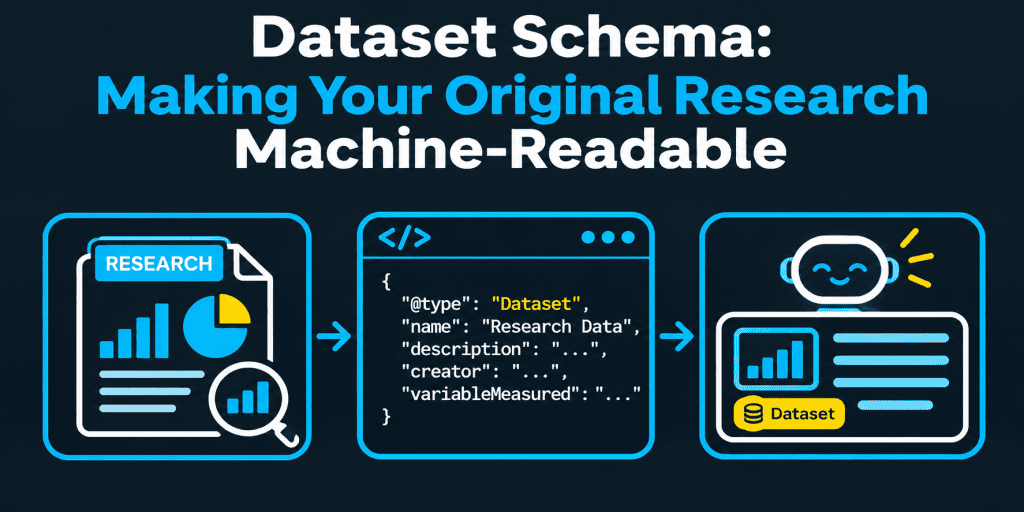
Dataset Schema: Making Your Original Research Machine-Readable
Idea: Dataset schema describes a body of data: its name, creator, licence, coverage, and download files. Google documents it for Dataset Search. For a brand, it only makes sense when the data itself is available to readers.
Challenge: A research report with charts is not automatically a dataset, and no one has published how AI tools use Dataset markup. Weak methods and unclear licences hurt trust more than missing code.
Summary: Publish the data with a clear method and licence, describe it with accurate markup, test it, and check whether your research is cited.
Related reads: First-Party Data and Content Strategy · Digital PR for SEO: Earning Citations · Content Verification Before Publishing
Dataset schema is structured data that describes a dataset: what it contains, who created it, under which licence, and where to download it. Google documents it for Dataset Search, which indexes schema.org Dataset markup.
For a company that publishes original research, it makes sense only when the data is available to readers, with a clear method and licence. No one has published how AI tools use the markup, so treat it as a clean description of data that must already be trustworthy. This guide is marketing advice, not legal advice.
What is dataset schema, and which meaning do you need?
The phrase has two meanings, and search results mix them.
| Meaning | What it is | Who needs it |
| Dataset markup (SEO) | Schema.org JSON-LD that describes a dataset on a web page so that search tools can find and cite it | Researchers, publishers, brands that release data |
| Dataset or database schema (data engineering) | The structure of tables, columns, and types inside a database or data tool | Data engineers and analysts |
This article covers the first meaning. It uses the Dataset type on schema.org and Google’s Dataset structured data documentation.
What is a schema, and how is it different from a data model?
A schema is a description of how something is structured. In a database, a schema defines tables, columns, and data types. A data model is the broader design of what the data means and how parts relate. The schema is one way to write that design down.
For example, a survey table might have columns for respondent ID, country, answer, and date. That layout is the database schema. Dataset markup is different: it describes the finished dataset to the outside world, such as its title, creator, licence, and download link.
If someone asks for the main types of datasets, there is no single standard list. Common groupings are tabular data, text collections, images, and time series. Schema.org does not force a type list, and it lets you describe any of them.
Is your original research a dataset?
Not always. A report with charts and percentages is a publication. A dataset is the underlying data that someone can examine or reuse.
| Situation | Better description |
| A report with charts and no downloadable data | Article markup, plus a clear method section on the page |
| A report plus a CSV or spreadsheet people can download | Dataset markup for the data file, linked from the report |
| A benchmark updated every year, with a stable data page | Dataset markup on that page, with the coverage period and version |
| Raw survey answers with personal details | Do not publish them. Publish an anonymized or aggregated file, if at all |
If you cannot share the data, do not mark up a dataset you do not publish.
Does dataset schema help AI search?
There is no published evidence of how AI assistants use Dataset markup. Some vendors say it improves citations. That is plausible but unproven.
| Claim | Evidence | How to treat it |
| Dataset markup helps Google Dataset Search find and describe data | Documented by Google | Follow the documentation |
| Dataset markup makes AI tools cite your research | Not documented | Test it with a controlled change |
| Specific, dated, well-explained data is easier to cite | Plausible, since sources need clear claims | Prioritize it |
Our guide to AI visibility experiment design shows how to test one change at a time.
Which properties does Dataset markup need?
Google lists two required properties: the name and the description. The description should be a real summary of 50 to 5,000 characters. Other properties are recommended. Treat this table as a direction, and confirm the details in the documentation.
| Property | Status | Notes |
| name | Required | A unique, descriptive title |
| description | Required | A genuine summary, not a placeholder |
| creator | Recommended | A Person or Organization, with a persistent identifier if you have one |
| license | Recommended | A URL for the exact licence version |
| distribution | Recommended | A DataDownload with contentUrl and encodingFormat |
| temporalCoverage, spatialCoverage | Recommended | The period and place the data covers |
| variableMeasured | Recommended | What the columns or measures mean |
| identifier, sameAs | Recommended | A DOI or a link to the canonical copy |
| keywords, isAccessibleForFree | Optional | Add them if they are true |
What does a Dataset JSON-LD example look like?
Here is a simplified example with placeholder values. It shows the structure, not a complete or required set of fields.
<script type=”application/ld+json”>
{
“@context”: “https://schema.org”,
“@type”: “Dataset”,
“name”: “Example Annual Benchmark Survey Data”,
“description”: “Anonymized, aggregated results from an example annual survey of small businesses, with a method note and a data dictionary.”,
“url”: “https://example.com/research/benchmark-data/”,
“creator”: { “@type”: “Organization”, “name”: “Example Research Team”, “url”: “https://example.com” },
“license”: “https://creativecommons.org/licenses/by/4.0/”,
“isAccessibleForFree”: true,
“temporalCoverage”: “2025-01-01/2025-12-31”,
“variableMeasured”: [“Business size”, “Region”, “Survey answer”],
“version”: “1.0”,
“distribution”: {
“@type”: “DataDownload”,
“encodingFormat”: “text/csv”,
“contentUrl”: “https://example.com/research/benchmark-data/data.csv”
}
}
</script>
Every value must match the visible page and the real data file. Use a real licence URL, real dates, and a working download link.
How do you make research data trustworthy and citable?
Markup describes quality. It cannot create it. Add these details to the page.
- State the method. Explain who was asked, how, when, and how many responded.
- Define the variables. Provide a short data dictionary.
- Show limits. Say what the data does not show.
- Version the data. Note the date and any changes.
- Give a citation line. Tell readers how to cite it.
- Remove personal data. Follow data-protection rules where you operate.
- Choose a licence. Common options include Creative Commons licences or your own terms. Ask legal advice if unsure.
Our guide to zero-party data explains how survey answers can become useful content.
How NEURONwriter helps: Content Designer’s Extract Facts feature can pull key facts from your own documents into an editable, structured form. Use it to draft the method summary and the main findings from your notes. It does not check that the numbers are right, so verify every figure against the source data. The SERP analysis also shows which headings and questions top pages cover, so you can plan the page around what readers ask.
How do you add Dataset markup?
Choose the method that keeps the description accurate.
- Create a dataset page. Give the dataset its own canonical URL.
- Describe the data on the page. Add the summary, method, and download links in visible text.
- Add JSON-LD. Put it in the page, and keep one source of markup.
- Link copies to the canonical page. If the dataset appears elsewhere, use sameAs to point to the canonical page.
- Make the page crawlable. Do not block it with robots.txt, noindex, or a login.
- Test and monitor. Validate before launch and review reports after.
How NEURONwriter helps: NEURONwriter Generate Schema Markup option creates JSON-LD from page content, but its FAQ names Blog, HowTo, Review, Product, and FAQ as examples and does not list Dataset. Check the type list in your editor. If Dataset is not offered, write the JSON-LD from your data record, or use your data platform’s output. The AI Readiness audit can still check whether structured data is present on a page.
How do you test and validate Dataset markup?
Test before and after launch.
- Run the Rich Results Test. Use Google’s Rich Results Test to check the markup.
- Validate the syntax. Use the Schema Markup Validator for general checks.
- Inspect the live URL. Use Search Console’s URL Inspection to see how Google fetches the page.
- Consider a sitemap. Include the dataset page in your sitemap.
- Check the download. Make sure the file URL works and matches the stated format.
Common errors include a missing description, a description that is too short, a broken download URL, and markup on a page that is blocked from crawling. Valid markup does not guarantee that a dataset appears in results.
How do you check whether your research is being cited?
You cannot see which signals AI tools use, so test the outcome. Ask the questions your research answers, across engines, and log which sources appear. Our citation-checking checklist explains the method, and our guide to AI citation source maps shows how to record what each citation supports.
How NEURONwriter helps: the AI Visibility module monitors the questions you add across Google AI Overviews, Google AI Mode, ChatGPT, and Perplexity. Its Overview shows metrics such as Domain Citations, and the Competitors view lists the most cited domains and pages, which can show who is cited for your topic. The Opportunities tab suggests tasks such as “Earn mention” on pages AI already cites. It does not read your markup, so check that yourself.
What are the basics of dataset schema at a glance?
This short guide collects what to remember about dataset schema markup.
- Use Dataset markup for real, accessible data. Do not mark up a report you do not share.
- Add the required properties. Include a name and a real description.
- Add useful metadata. Creator, licence, coverage, and download links help readers and tools.
- Use JSON-LD. It is usually easier to maintain than microdata or RDFa.
- Keep the canonical page clear. Point copies to it.
- Do not expect AI gains. No evidence supports that claim.
Dataset markup is a form of structured data that adds machine-readable context. It does not replace a clear method or a good dataset.
How does Dataset markup relate to open data, DCAT, and data catalogs?
Dataset markup is one of several ways to describe data. Government data portals, scholarly repositories, and open data programs often use a metadata schema called DCAT, a W3C vocabulary for data catalogs. A government agency may keep an inventory of its datasets in that format, and a repository may publish a record for each deposit.
Google’s guidelines say that it can understand Dataset markup from schema.org, or equivalent structures in DCAT. It also mentions experimental support for CSV on the Web. So the schema.org vocabulary is the common default, but not the only route to dataset discovery.
- Use of schema.org. The Dataset type, DataCatalog, and DataDownload are used to describe datasets, their catalogs, and their files.
- Mapping. If your data platform stores metadata in another format, mapping its fields to schema.org properties lets you reuse the same record on the web page.
- Persistent identifiers. A DOI, an ORCID for a person, or a ROR for an organization can make the representation of a creator clearer. Wikidata links can also help identify an organization or topic.
- Software and APIs. Many repository tools and APIs can output the markup for you. Review the output as a string of text against the visible page, and keep the code under version control.
- Programming effort. A small team can write the JSON-LD by hand once and reuse it as a template.
An official website that publishes statistics can follow the same pattern. The Google guideline is the same for everyone: describe the data accurately, keep the page crawlable, and add the markup to the canonical page. These best practices turn a collection of data into a resource that others can find, cite, and reuse. The official Google documentation remains the source of truth for what Dataset Search accepts.
Common dataset schema mistakes
- Marking up a report with no data. Describe only what readers can access.
- A thin description. Write a real summary.
- No licence. Readers do not know how they may reuse the data.
- Broken download links. Check them regularly.
- Personal data in the file. Remove or anonymize it first.
- Stale versions. Show the date and keep one canonical page.
How does NEURONwriter help with original research?
NEURONwriter helps you plan the research page, draft the method summary, check structured data presence, and watch whether your research is cited. It does not generate Dataset markup unless your editor’s type list shows it, and it does not validate markup or check your data.
- Plan the page. SERP analysis shows competitor headings, suggested terms, and related questions. The content editor and score show whether a draft covers what top pages cover.
- Draft from your sources. Content Designer can extract facts from your own documents, and Neuro runs short commands such as adding an FAQ section or shortening a summary.
- Check presence. AI Readiness checks whether structured data and AI crawler access are in place.
- Monitor citations. AI Visibility tracks Monitored Discussions across four AI engines, with Domain Citations, Competitors, and Opportunities views.
You can run a keyword analysis in NEURONwriter before you plan your next research page. Treat every score as a guide, because no tool can guarantee citations or Dataset Search results.
FAQ
What is dataset schema?
Dataset schema is structured data that describes a dataset, including its name, creator, licence, coverage, and download files. The phrase is also used for the structure of tables in a database.
What is a schema in a database, with an example?
It defines tables, columns, and data types. For example, a survey table may have columns for respondent ID, country, answer, and date.
What is the difference between a schema and a data model?
A schema describes the structure of data. A data model is the wider design of what the data means and how its parts relate.
What are the three main types of datasets?
There is no standard list. Common groupings are tabular data, text collections, images, and time series.
What does a dataset schema contain?
For Dataset markup, a name, a description, and recommended details such as creator, licence, coverage, and download files.
Why are dataset schemas important?
They help people and tools understand what data exists, who made it, and how to use it.
How do you create or define a dataset schema?
Write the visible dataset page first, then add JSON-LD with the required and recommended properties, and test it.
Is Dataset schema only for scientific data?
No. Google’s documentation covers many kinds of data, including statistics and business data, as long as the data is available and described.
What does the dataset measure?
Use the variableMeasured property and the page text to say what each column or measure represents.
What if my dataset has multiple file formats?
Add one DataDownload for each format, each with its own contentUrl and encodingFormat.
Can I nest datasets inside other datasets?
Yes. Schema.org lets a dataset include parts, and Google’s documentation includes an example of sub-datasets.
Which licensing option should I use?
It depends on how you want others to reuse the data. Common options are Creative Commons licences or custom terms. Use the exact licence URL, and ask legal advice if unsure.
Why is my dataset schema not showing in results?
Common causes are missing required fields, a short description, a blocked or login-only page, a broken download link, or indexing delays. Valid markup does not guarantee display.
Does dataset schema work for AI search?
No published evidence shows that AI tools use it. Clear, dated, well-explained data on a crawlable page is the safer investment.