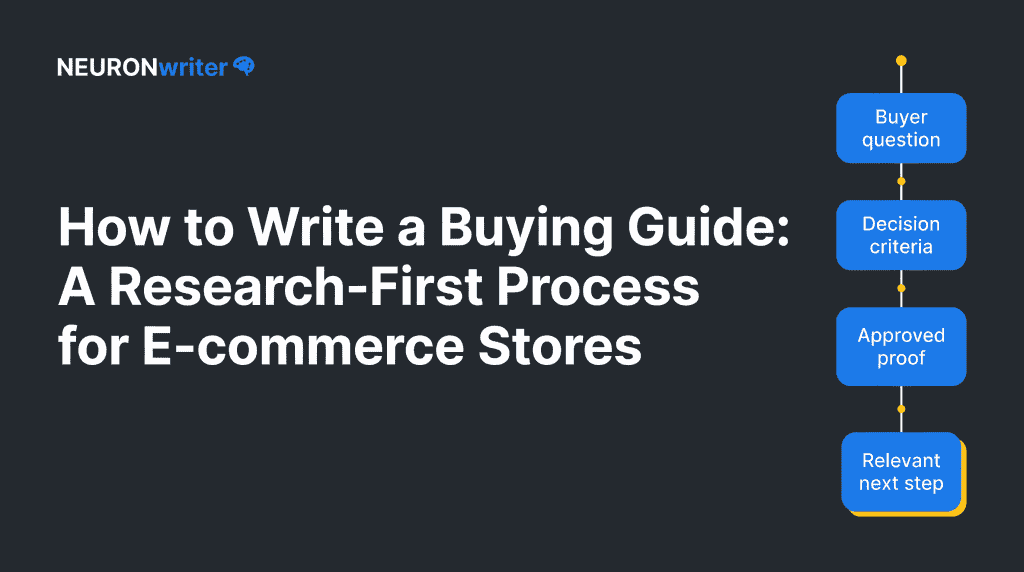
How to Write a Buying Guide: A Research-First Process for E-commerce Stores
Semantic Summary
Idea A useful buyer’s guide helps a shopper understand how to choose within a product category before asking them to choose a specific product.
Challenge Many stores publish product lists or repeat product-page copy. That leaves the buyer without a clear way to compare options, judge trade-offs, or trust the next step.
Summary Start with a real buying question, set clear comparison criteria, support claims with approved facts, write in a scannable format, then link the reader to the most relevant category or product page.
Related Reads
- Product-Led SEO: Stop Writing for Traffic
- How to Write Content for AI Search
- Content Governance for SEO
What Is a Buyer’s Guide?
A buyer’s guide is a practical piece of content that helps a person make a purchase decision. It explains the decision before it pushes a product. A good guide answers questions such as: Which features matter? What trade-offs should I expect? Which type fits my situation? What should I check before I buy?
A buyer’s guide is not a product catalogue. It does not need to name every item a store sells. Its first job is to reduce uncertainty. Its second job is to help the reader find a relevant product category or product page when they are ready.
Buyer’s guide vs. category page vs. product page
These pages serve different moments in the buying journey. A category page helps a shopper browse a group of products. A product page helps them assess one specific product. A buyer’s guide sits earlier in the process. It teaches the reader how to make a sensible choice.
| Page type | Reader’s main question | Best content | Useful next step |
| Buyer’s guide | “How do I choose?” | Criteria, definitions, trade-offs, use cases and proof | Relevant category page or filtered collection |
| Category page | “What options are available?” | Product range, filters, short category guidance and clear navigation | Product page |
| Product page | “Is this the right item?” | Specific features, price, availability, specifications and return details | Add to basket, save or compare |
Keeping those roles separate prevents duplication. It also makes the reader journey easier to follow.
Why buyer’s guides are useful for e-commerce stores
A product category can feel confusing when several options look similar. A guide gives the shopper a decision path. For example, rather than opening with a long list of products, a guide can explain the two or three criteria that change the choice most.
That approach supports people-first content. Google recommends content made primarily to help people, with clear expertise, useful original value and a satisfying answer to the reader’s goal. A buyer’s guide should therefore offer a real explanation, not a thin page written only to capture a keyword.
Why Your Business Needs Buyer’s Guides
A buyer’s guide gives a store one dependable piece of content marketing for the research stage. It can help customers understand a category before they are ready to choose a specific product. That is useful when a category has unfamiliar terms, several product types, meaningful price differences or a risk of buying the wrong fit.
The purpose is not to force a conversion. The purpose is to help shoppers reach a clearer purchase decision. A reader who understands what to compare can browse a category with less friction and can take the next step with more confidence.
That can be a useful outcome even when the person does not make a purchase on the same visit.
Treat it as a durable buyer’s guide on your website, not a one-off promotion. It can support product descriptions, category navigation, email replies and content for social media, as long as each use sends people back to the same approved explanation.
This makes future updates easier and reduces the chance that different pages give different advice.
Start with a Real Buying Question
The best buyer’s guide begins with one narrow question that a real shopper asks before buying. Do not start with a product list. Start with the uncertainty behind the product search.
A broad topic such as “kitchen equipment” is too wide. A stronger starting point is a question such as “Which size is right for a small household?” or “What should I compare if I need this for travel rather than daily use?”
The question gives the guide a purpose and protects it from becoming a vague overview of a whole category.
Find questions in first-party evidence
Use evidence your team already has. Review customer-service conversations, site-search terms, product returns, pre-purchase emails, reviews, sales calls and category-page feedback. Look for questions that repeat, not for isolated requests.
Write down the question exactly as a shopper phrases it. Then note what makes the decision hard. The pain point may be a missing definition, confusing feature, size choice, compatibility issue, delivery limitation or trade-off between two benefits.
| Evidence source | What to look for | What it may reveal |
| Site search | Repeated wording and refinements | A decision criterion missing from navigation or content |
| Support questions | Questions asked before purchase | A step or term that needs plain-language explanation |
| Product reviews | Praise, confusion and practical use cases | The proof buyers value and the limits they should understand |
| Return reasons | Mismatch between expectation and product | A claim, sizing rule or use case that needs clarification |
| Category-page behavior | Filters, exits and comparison actions | Where product discovery becomes difficult |
Do not treat a search term as proof by itself. Read the surrounding evidence. A query that includes “best” may actually mean “help me understand what matters,” not “give me a ranked list.”
Choose one audience and one decision
A guide cannot help everyone at once. Name the target audience and the decision they need to make. If a category serves beginners and experienced users, write separate sections only when their criteria are genuinely different. Otherwise, explain the difference through a simple choice rule.
A practical decision statement has four parts:
For [specific shopper], who needs [job or outcome], this guide explains how to compare [important criteria] so they can choose the right [type of product] for their situation.
This is not a public slogan. It is a writing guardrail. It keeps the article focused on the buyer rather than on the store’s preferred products.
Choose the Right Type of Buyer’s Guide
The types of buyer’s guides should match the kind of uncertainty the shopper has. The same content format does not work for every category.
Comparison guide
Use a comparison guide when buyers need to weigh two or more approaches. Explain the criteria first, then show which option suits each use case. Avoid declaring one option universally best.
Feature guide
Use a feature guide when product language is confusing. Define each feature in everyday terms, explain when it matters and state when it may not be worth paying for.
Use-case guide
Use a use-case guide when the buyer’s situation determines the choice. Organize the content around tasks, environments or user needs instead of technical specifications alone.
Size, fit or compatibility guide
Use this format when a poor fit creates returns or disappointment. Make measurements, conditions and exceptions clear. Link to the exact category or product information that lets the reader check their choice.
| Guide type | Best for | Core question | Evidence to include |
| Comparison | Several valid product routes | “Which approach fits my needs?” | Trade-offs, use cases and limits |
| Feature | Technical or unfamiliar categories | “Which features matter?” | Plain definitions and practical effects |
| Use case | Products used in different ways | “What fits my situation?” | Situation-based recommendations and constraints |
| Fit or compatibility | Size, setup or connection matters | “Will this work for me?” | Measurements, requirements and exceptions |
Buyer’s Guide Examples You Can Adapt
The best examples are not always long product roundups. A good buyer’s guide makes one decision easier, then gives the reader a sensible route to a relevant product category. The format should follow the shopper’s question.
Example 1: The first-purchase guide
Use this when a customer is new to a category. Start with the job they want the product to do. Define the few terms that might block understanding, explain the basic types of product and show the criteria a first-time buyer should check. Clear CTAs can lead to a category page or filtered collection.
Example 2: The comparison guide
Use this when buyers must choose between two valid product routes. Explain the trade-off in a table, state which use case suits each option and include the limits of each choice.
Do not call one option the best unless the context proves it. This format supports a more informed decision than a generic product list.
Example 3: The fit or compatibility guide
Use this when a small detail can create a poor experience after purchase. Explain measurements, setup needs, connection rules or product compatibility in the order a shopper can check them. Link to product pages only after the reader knows what information to confirm.
These guide examples are a starting point, not a template to copy word for word. The purpose of a buyer’s guide is to answer the questions that matter in one category, for one audience, at one point in the buying process.
What to Include in a Good Buyer’s Guide
A good buyer’s guide does not need every possible fact. It needs the information buyers need to make an informed decision. The structure should move from the decision to the evidence, then to a reasonable next step.
Start with a direct answer to the category question. Next, define unfamiliar terms. Then explain the criteria in the order a shopper can use them. After that, show realistic use cases and limitations.
End with a call to action that links to the relevant product category, not a forced sales message. An effective buyer’s guide gives shoppers the information they need to make informed decisions: an overview of the product, its key features, representative customer reviews and a clear next step for people ready to make a purchase.
Use clear comparison criteria
Choose criteria that change the decision. “Colour” may be important in one category but irrelevant in another. A criterion belongs in the guide when it affects the product’s suitability, long-term value, safety, maintenance, performance or total cost.
For each criterion, explain three things: what it is, why it matters and which buyer should care most. This makes the guide scannable and helps readers skip what does not apply to them.
Separate facts, interpretation and proof
A buyer’s guide can be useful without making sweeping promises. Treat facts as verified product details. Treat interpretation as an explanation of what those facts may mean in a use case. Treat proof as the approved source that supports the claim.
The U.S. Federal Trade Commission states that advertisers should have a reasonable basis for objective claims before those claims are shared.
That principle is useful even where a guide is not an advertisement in the narrow sense. Before publishing a product claim, ask whether your team can show where it came from and whether its wording matches the evidence.
| Content element | Example question | Safe action |
| Product fact | “Does this product include this feature?” | Check approved specifications or documentation |
| Practical interpretation | “Who benefits most from this feature?” | Describe the use case without overstating an outcome |
| Comparison | “How does one option differ from another?” | Compare agreed criteria, not vague superlatives |
| Customer proof | “What do users value in real use?” | Use approved, representative feedback with context |
| Outcome claim | “Will this save time or improve results?” | Use only when evidence and wording are approved |
How to Create a Buyers Guide in Eight Steps
Use the following process to create a buyers guide that is useful and easy to update.
1. Define the buying question
Choose one question, one audience and one category. If the guide has no clear decision to support, do not write it yet.
2. Collect approved product information
Gather current specifications, pricing rules, availability notes, warranty or return information, user feedback and internal product knowledge. Mark any fact that needs approval before publication.
3. List the decision criteria
Write the small number of criteria that truly change the choice. Put them in a logical order, usually starting with the buyer’s main use case rather than the most technical detail.
4. Build a simple outline
A practical outline usually includes an opening answer, a short explanation of the category, decision criteria, use cases, common mistakes, a next step and FAQ. Use headings that state what the reader will learn.
5. Write for fast, easy reading
Use short paragraphs, headings, tables and plain words for fast and easy reading. A buyer should be able to scan the guide and find the section that answers their question. Do not hide the important detail inside a long introduction.
6. Add links at the right moment
Link to a relevant category page after the reader understands the criteria. Link to a product page only when the guide has explained why it may fit. Internal links should help navigation, not interrupt the reader every sentence.
7. Use a restrained call to action
A call to action should reflect the reader’s stage. A person still comparing options may need “Browse products by size” rather than “Buy now.” A good CTA tells the reader what the next page will help them do.
8. Review, publish and schedule an update
Check factual claims, links, language and product availability. Assign an owner and a review date. A guide is not finished because it is published; product categories, stock, rules and customer questions can change.
Build a Buyer’s Guide Template Your Team Can Reuse
A reusable template speeds up work without making every guide sound the same. It gives writers a shared structure while leaving room for category-specific questions.
| Section | What it should do | Check before publishing |
| Opening answer | State the decision the guide helps with | Does the reader know whether this guide is for them? |
| Buyer context | Name the audience and situation | Is the audience narrow enough to be useful? |
| Key criteria | Explain the factors that change the choice | Are the criteria supported by product or customer evidence? |
| Use cases | Connect criteria to real situations | Do examples avoid unsupported promises? |
| Comparison table | Make trade-offs easy to scan | Does every row help a decision? |
| Product discovery links | Route the reader to a category or product page | Does each link match the paragraph before it? |
| CTA | Offer a sensible next step | Is the action appropriate for the reader’s readiness? |
| Update note | Record owner and review date | Can the team verify changes later? |
Buyer’s Guide SEO: Help Search Engines Understand the Guide
SEO should make a good guide easier to discover and understand. It should not turn the guide into a list of repeated phrases.
Use search terms, including a form such as “buyers guide,” only when they match the real question. Search engines like Google should lead people to a clear page, not a page built only for traffic to your site.
Add structured information to product pages where it is appropriate. Google explains that Product structured data can make product information eligible for richer presentation in Search, including details such as price, availability and reviews. A buyer’s guide is not a substitute for accurate product-page information.
Keep the guide distinct from product pages
The guide should explain how to choose. Product pages should explain what this product is. Repeating the same description on both pages wastes space and makes the journey less clear.
Use the guide to define categories and criteria. Use the product page for current specifications, purchase information and product-specific proof. This separation gives each page a clear reason to exist.
Make the page easy to extract and quote
Answer the section question in the opening sentence. Use a simple table for trade-offs. Define terms before using them. Include an update date when the category changes quickly. These choices help people, and they also make each passage easier for search systems to interpret.
Buyer’s Guide Content Marketing: Promote, Distribute and Add CTAs
Publication is the start of the guide’s life, not the end. Connect it to the category page, relevant educational pages, newsletters, customer-support responses and appropriate social content.
Use the same buyer question when you describe the guide elsewhere. This consistency helps readers understand why they should open it.
Do not spread the full guide across multiple pages simply to create more URLs. Keep the main answer together. If a subtopic deserves its own page, give it a clearly different question and link the two pages in both directions.
Measure whether the guide is helping
Choose one primary signal that matches the guide’s role. This might be visits from relevant searches, clicks from the guide to a category page, use of a category filter after reading, or fewer repeated pre-purchase questions.
Use one safety check as well, such as whether readers quickly return to search or whether the guide drives people to irrelevant products.
Do not claim that one click proves a guide caused a sale. Many factors shape a purchase. Instead, collect a small body of evidence over time, review it with the category owner and update the guide when a real gap appears.
Common Buyer’s Guide Mistakes
Writing a product list before explaining the choice
A long list leaves the reader with the same uncertainty they had at the start. Explain the criteria first. Then let the reader browse with more confidence.
Treating every feature as equally important
The goal is not to document everything. It is to explain the few features or conditions that change the decision for the intended audience.
Making claims nobody can verify
Avoid phrases such as “perfect,” “best for everyone” or “guaranteed” unless the evidence and approval process clearly support the claim. Clear limits often build more trust than inflated promises.
Using the same call to action everywhere
A reader who is early in the buying process needs a helpful next step, not pressure. Match the CTA to the question they have just answered.
Forgetting to review the guide
A stale guide can create confusion when product details or category rules change. Keep an owner, review date and short change log.
How NEURONwriter Fits the Process
NEURONwriter can support research, content briefing and drafting once the team has approved the buyer question, product facts, comparison criteria and intended next step. It can help writers cover relevant search terms and questions without losing the reader’s goal.
It does not replace product expertise, customer research or factual approval. Use it after the guide’s decision framework is clear, not as a substitute for that framework.
Frequently Asked Questions About Buyer’s Guides
What is a buyer’s guide?
A buyer’s guide is educational content that helps a person compare options before choosing a product. It explains what to consider, why each criterion matters and where to go next when the reader is ready to browse.
What should a buyer’s guide include?
Include the buyer question, the target audience, the most important decision criteria, plain-language definitions, useful trade-offs, approved proof and a relevant next step. Add only information that helps a real purchase decision.
How is a buyer’s guide different from a product page?
A buyer’s guide explains how to choose within a category. A product page explains one specific item, including its current details, availability and purchase information. The guide should link to the product page when that product matches the reader’s needs.
How long should a buyer’s guide be?
It should be as long as the decision requires. A simple category may need a short, focused guide, while a complex purchase may need more definitions, comparisons and examples. Do not add length only to target a word count.
Do buyer’s guides help SEO?
They can help when they answer a real search question and connect clearly to relevant category and product pages. The priority is usefulness: a reader should understand the decision better after reading the guide.
Should a buyer’s guide recommend specific products?
It can, but only after it has explained the criteria and only when the recommendation is current, supported and useful. Many guides work better when they link to a filtered category page rather than naming a single product.
Where should I place calls to action in a buyer’s guide?
Place a CTA after the reader has enough information to take a meaningful next step. Use a category or filter link while they are still comparing options, and use a product-page link when the guide has explained why that item may fit.
How often should an e-commerce buyer’s guide be updated?
Review it whenever product details, availability, pricing rules, return policies or buyer questions materially change. For stable categories, assign a routine review date and keep a short record of what changed.
Can one buyer’s guide serve every shopper?
Usually not. One guide can serve a defined audience with a shared question. If beginners and experienced buyers need different criteria, create clear paths or separate guides rather than making one page too broad.