
How to Find Striking Distance Keywords in GSC
Semantic summary
Idea: A striking distance audit is the process of finding keywords where your website already ranks on page one or two of Google, but just outside the top three spots (usually positions 4 through 15). Because Google already considers your page relevant, making small, targeted optimizations can push these pages into the top three, resulting in massive traffic gains without creating any new content.
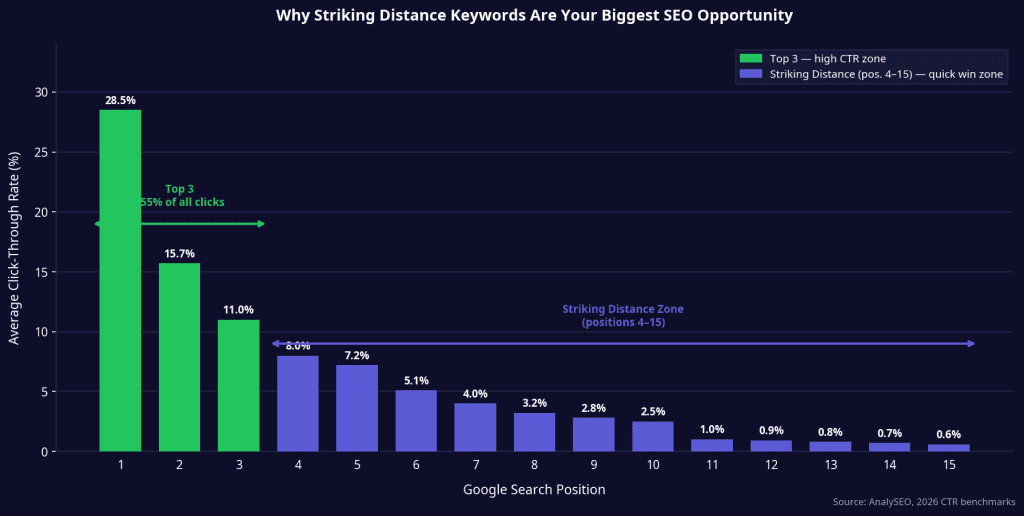
Challenge: Most content teams spend all their time creating new articles, ignoring the pages that are already sitting on the edge of success. The math of search results is brutal: position 1 gets about 28% of all clicks, while position 8 gets less than 4%. If you do not actively push your page from position 8 to position 3, you are leaving thousands of clicks on the table.
Summary: You can find these quick wins using Google Search Console (GSC) by filtering for queries ranking between 4.9 and 15.1. Once identified, you can use NEURONwriter to close the semantic gap, update title tags, and add internal links. This strategy often doubles the organic traffic of an existing page in less than 30 days.
Related reads:
Content Syndication in 2026: Safe Strategies That Won’t Trigger Duplicate Penalties
Entity Salience: How Google Determines What Your Page is Really About
Creating new content is expensive and slow. It takes hours to write, weeks to index, and months to rank.
But what if you could double your organic traffic by spending just 15 minutes tweaking an article you wrote six months ago?
This is not a hypothetical scenario. It is the exact result of running a striking distance audit. By finding the keywords where you are already so close to winning, you can focus your SEO efforts on the pages that will deliver the highest return on investment.
Here is exactly how to find these quick wins in Google Search Console and how to push them into the top three.
The Brutal Math of Google Rankings.
To understand why a striking distance audit is so powerful, you have to look at how people actually click on Google search results.
The difference between ranking #1 and ranking #8 is not a small drop-off. It is a cliff. According to 2026 data, the top three positions capture roughly 55% of all clicks . By the time you reach position 11 (the start of page two), you are getting less than 1% of the clicks.
This means that moving a keyword from position 8 to position 3 is not a 50% improvement in traffic. It is a 5x to 10x improvement in traffic.
These keywords are in “striking distance” because the gap between where you are and where the clicks actually happen is small enough that minor optimizations can close it. Google has already decided your page is relevant. You just need to prove it is the best answer.
How to Find Striking Distance Keywords in GSC.
You do not need expensive third-party tools to find these opportunities. The most accurate data is already sitting in your Google Search Console account.
Here is the exact, step-by-step workflow:
- Open the Performance Report: Go to Google Search Console and click on Search results under the Performance tab. Set the date range to the last 28 days to ensure you are looking at current data.
- Add a Position Filter: Click the + New filter button at the top and select Position. Choose Custom and set it to Greater than 4.9 and Less than 15.1. This isolates the queries sitting just outside the top spots.
- Filter for Meaningful Volume: Click the Impressions column to sort from highest to lowest. Ignore queries with fewer than 100 impressions. A keyword ranking at position 12 with 10 impressions a month is not worth your time.
- Find the Exact URL: Click on a promising query, then switch to the Pages tab. This shows you exactly which URL is ranking for that keyword.
You now have a prioritized list of pages that are on the edge of massive traffic gains.
The 3-Step Optimization Playbook.
Not every striking distance keyword requires a complete rewrite. In fact, most of the time, the page is just missing a few key signals.
Here is how to optimize those pages, starting from the easiest fixes.
1. The Title Tag and H1 Alignment.
Google prioritizes pages where the exact keyword appears in the title tag, ideally toward the front. Often, a page ranks at position 8 simply because it answers the question well, but the title tag does not explicitly match the user’s intent.
Check your title tag and your main H1 heading. Do they contain the striking distance keyword? If your H1 says “How to Write a Marketing Plan” but the striking distance query is “Marketing Plan Template,” you have a mismatch. Rewriting the title and H1 to align with the query is the fastest way to jump 2 to 5 positions.
2. Closing the Semantic Gap
If your title tag is perfect and you are still stuck at position 6, it means your competitors are covering the topic more comprehensively. Google ranks pages that cover a topic completely, not just pages that mention a keyword.
This is where NEURONwriter becomes your unfair advantage.
Take the URL you found in GSC and the striking distance keyword, and plug them into NEURONwriter. The tool will analyze the pages currently ranking in the top three and show you exactly which NLP entities and subtopics your page is missing.
If the top three pages all have a section explaining “Pricing” and your page does not, NEURONwriter will flag it. Adding that one missing section is often all it takes to break into the top three.
3. The Internal Link Boost
Internal links pass authority from your strongest pages to your striking distance pages.
Go to Google and search site:yourdomain.com “your striking distance keyword”. This will show you every page on your website that mentions the topic. Go into those pages and add an internal link pointing to your striking distance URL, using the exact keyword as the anchor text.
Stop Guessing, Start Auditing
“Striking distance keywords are the highest-ROI SEO work most sites can do. We’ve seen sites double organic traffic in 60-90 days by focusing only on the 10-20 strongest opportunities, with no new content created.” — AnalySEO 2026 Report
The secret to SEO growth in 2026 is not always publishing more. Often, it is simply finishing the job you already started.
Run a striking distance audit today. Pick your top five opportunities. Tweak the titles, use NEURONwriter to close the semantic gaps, and add three internal links. Then watch what happens to your traffic in the next 30 days.
FAQ
What exactly is a striking distance keyword?
A striking distance keyword is a search query where your website currently ranks between positions 4 and 15 on Google. These keywords are close enough to the top three spots that minor on-page optimizations can push them higher, resulting in massive traffic increases.
Why should I focus on striking distance keywords instead of new content?
Moving a page from position 8 to position 3 can increase its traffic by 500%. Because the page is already indexed and trusted by Google, optimizing it takes a fraction of the time and money required to research, write, and rank a brand-new article.
How do I find striking distance keywords for free?
You can find them using Google Search Console. Open the Performance report, set the date range to the last 28 days, and apply a custom Position filter for queries ranking greater than 4.9 and less than 15.1. Sort by impressions to find the biggest opportunities.
What is the fastest way to improve a striking distance page?
The fastest quick win is aligning the Title Tag and the H1 heading with the exact striking distance query. If the user is searching for a specific phrase and your title uses a different variation, simply updating the title can bump your ranking within days.
How does NEURONwriter help with striking distance audits?
NEURONwriter analyzes the top-ranking competitors for your striking distance keyword and identifies the semantic gaps in your content. It tells you exactly which terms, entities, and subtopics you need to add to your existing page to make it more comprehensive than the current top three results.
How many internal links should I add to a striking distance page?
Adding 3 to 5 internal links from contextually relevant pages on your own website is usually enough to move the needle. Make sure to use the striking distance keyword (or a close variation) as the anchor text for those links.
How long does it take to see results from these optimizations?
Because the page is already indexed and ranking, results from striking distance optimizations happen quickly. You will typically see movement in Google Search Console within 14 to 30 days after making the updates and requesting indexing.