Canonical Tags for SEO: When and How to Use rel=”canonical”
Semantic Summary
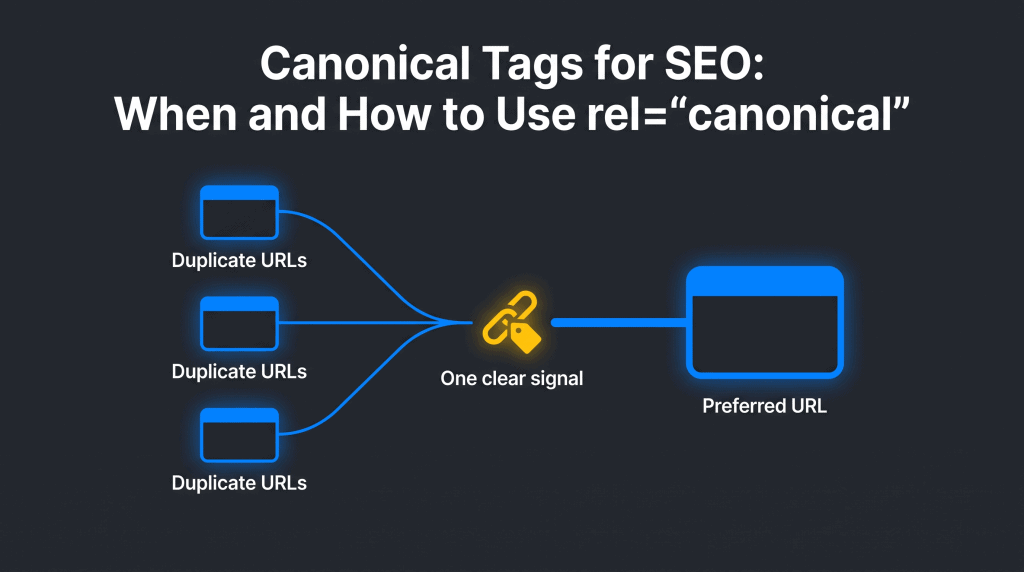
Idea A canonical tag tells search engines which URL you consider the preferred version when several URLs show the same or very similar content.
Challenge A canonical tag is not a cure-all. The wrong target, a conflicting redirect, or a canonical on pages that are actually different can hide useful content and create mixed signals.
Summary Keep one clear preferred URL, use a canonical tag only when alternate pages need to stay available, and align that choice with redirects, internal links, sitemaps, and a regular SEO audit.
Related reads:
- Technical SEO for Beginners: A Simple Guide
- 301 Redirects for SEO: How to Move URLs Without Losing Context
- SEO-Friendly URLs: A Practical Guide to Clear, Crawlable URL Structure
What Is a Canonical Tag and a Canonical URL?
A canonical tag is a short HTML instruction that names the preferred version of a web page. A canonical URL is the address named by that tag. Together, they help a search engine understand which URL should represent a group of duplicate pages in search results.
For example, a product page might be reachable through a clean URL and through several tracking or filter URLs. People can still use each path, but the site can signal that one clean address is the canonical page. The basic canonical link element belongs in the document’s <head>:
<link rel=”canonical” href=”https://example.com/green-jacket/” />
The phrase canonical tag describes the element. The phrase canonical URL describes the preferred address inside it. Keeping that distinction clear makes technical SEO decisions much easier to explain and check.
A simple canonical URL example
Imagine that a shop’s green jacket is available at https://example.com/green-jacket/ and at https://example.com/green-jacket/?source=email. Both URLs show the same web page. The second version can include a canonical tag that references the clean first URL. That canonical tag tells search engines which version of the page is the preferred URL for search results.
In this example, the visitor can still open the email link and buy the jacket. The site does not need a redirect just because a tracking parameter exists. Using a canonical tag lets the site retain a useful campaign URL while signaling that the clean canonical URL is the primary version.
Why Canonical Tags Are Important for SEO
Canonical tags help consolidate signals from duplicate content around one preferred URL. They are useful when several versions need to remain accessible to people, but you want search engines to understand that one version is the primary page.
Google describes redirects and rel=”canonical” link annotations as strong canonicalization signals, while sitemap inclusion is a weaker signal. Those signals work best when they agree. A canonical tag therefore supports an SEO strategy; it does not guarantee that a search engine will select your preferred URL.
- It can help: point search engines toward the version of the page you want shown in search results, consolidate signals for duplicate or near-duplicate URLs, and make reporting easier to interpret.
- It cannot: turn unrelated pages into one page, repair a broken destination URL, replace a permanent redirect when a page is gone, or force a search engine to ignore stronger conflicting evidence.
If a search engine selects a different canonical URL, treat that as a diagnostic clue. Check the page content, server behavior, internal links, sitemap entries, and the canonical tag itself before assuming the tool is wrong.
Is a Canonical Tag a Meta Tag?
A canonical tag is page metadata, but technically it is an HTML link element rather than a general meta tag. It sits with other SEO-related information in the HTML head and identifies the canonical URL for a particular web page.
That difference does not need to complicate your workflow. The practical rule is to check the rendered head of every important page: it should contain one canonical link element, and that link should name the URL you want search engines to understand as the primary version. Other SEO meta tags, such as a title or description, serve different jobs and do not select a canonical page.
Why a search engine may ignore a canonical tag
Canonical tags are signals, not commands. A search engine may choose another URL when the target is broken, redirects, contains less complete content, or conflicts with internal links and sitemap entries. It may also reject a canonical tag that points between pages that are too different. The fix is not to add another tag; make one clear canonical choice and remove the conflicting signal.
Canonical Tag vs. 301 Redirect vs. Noindex: Choose the Right Action
The right action depends on whether the alternate URL must still work for a visitor and whether the pages genuinely serve the same purpose. Use a canonical tag to keep similar pages available; use a 301 redirect when the old page has been replaced; use noindex only when a page should remain usable but should not appear in search.
| Situation | Best action | Why | What to check |
| One page has tracking, session, or other parameter variations. | Use a canonical tag to the clean preferred URL. | The alternate URLs can remain usable without competing as separate pages. | Every version points directly to the same final canonical URL. |
| An old page has been permanently replaced or merged. | Use a permanent 301 redirect. | Visitors and crawlers should reach the replacement page, not an abandoned page. | The destination is relevant, live, and not redirected again. |
| An internal search result or a thin filter combination must work for visitors but has no search value. | Use noindex where appropriate. | The goal is exclusion from search, not choosing a representative version. | Do not describe noindex as a substitute for canonicalization. |
| Two pages answer different user needs or contain materially different information. | Keep both indexable with self-referencing canonical tags. | They are not duplicate content, even if they share a template or a keyword. | Give each page a clear purpose, title, and internal-link context. |
| Pages 1, 2, and 3 of a paginated list contain different items. | Give each page its own canonical URL. | Later pages are not duplicates of page 1. | Use crawlable next-page links and unique URLs. |
Do not use robots.txt to choose a canonical page. Google can still index a blocked URL without reading its content, so a blocked duplicate may not pass a useful canonical signal. Likewise, a noindex directive removes a page from search rather than naming a preferred version.
When to Use Canonical Tags
Use a canonical tag when multiple pages are duplicate or very similar, the alternate URLs need to stay available, and one URL is clearly the best page for search. The canonical URL should be a true representative of the other versions—not merely a page you would prefer to rank.
Tracking and parameter URL variations
A link from an email, campaign, or social post may add parameters to a URL. When the underlying page stays the same, the parameter URL can use a canonical tag that points to the clean page. This protects the preferred version from being diluted by many alternate addresses.
Similar product or category views
Some ecommerce sites create many URLs from sorting, currency, or display controls. If the visible products and purpose are substantially the same, a canonical tag can point to the main category or product URL. Do not point a page to a canonical URL that removes important selection choices, product information, or helpful unique copy.
Cross-domain copies and syndication
Cross-domain canonicalization needs more care than a same-site canonical. A partner copy may differ enough that a canonical tag is not the right solution. Agree on the indexing plan first, and use the separate content syndication guide for the broader publishing workflow. Never add a cross-domain canonical simply to solve a business disagreement about visibility.
How to Implement Canonical Tags Correctly
A correct canonical tag is simple: use one tag, place it in the HTML head, and point it directly to the final preferred URL. The difficulty is not typing the line of code; it is keeping the choice consistent across every system that refers to the page.
- Choose the preferred URL. Pick the clean, live version that best represents the content and is the address you want people to share.
- Use an absolute URL. Include the full protocol and domain, such as https://example.com/page/, rather than a relative path.
- Add only one canonical tag. Your CMS, theme, and custom code must not output different canonical URLs on the same page.
- Add a self-referencing canonical. The canonical page should usually name itself. This reinforces the preferred version when unexpected URL parameters appear.
- Point alternate pages straight to the final target. Do not build canonical chains such as A → B → C, and do not point a canonical tag to a URL that then redirects.
- Review the rendered source. View the final HTML that a crawler receives, not only a setting screen in your CMS.
For a non-HTML file, such as a document download, the canonical link can be sent as an HTTP response header instead of an HTML element. For ordinary web pages, use the canonical link element in the head and keep the implementation easy to inspect.
Align Internal Links, Sitemaps, and Canonical URLs
A canonical tag works best when the rest of your site agrees with it. Internal links, XML sitemap entries, redirects, and the page’s own canonical URL should all favor the same version whenever that version is meant to be the canonical page.
- Internal links: link to the preferred URL rather than a parameter or alternate version.
- XML sitemap: include the canonical URL, not a mix of canonical and non-canonical URLs.
- Redirects: send retired URLs directly to the final destination. For the migration decision itself, see 301 Redirects for SEO.
- URL structure: limit unnecessary paths before they multiply. The SEO-Friendly URLs guide explains how clear, stable addresses reduce avoidable variations.
Language versions deserve a separate decision. Fully translated pages are not duplicate content simply because the topic is similar. In a multilingual setup, each language page should normally canonicalize to its own version, while hreflang explains the alternatives. Use the multilingual website guide for the implementation details.
Common Canonical Tag Mistakes and How to Fix Them
Most canonical problems come from a mismatch: the tag says one thing while page content, links, redirects, or server settings say another. Fix the mismatch rather than adding more tags.
| Problem | Why it causes trouble | Practical fix |
| Two or more canonical tags on one page | A search engine receives conflicting instructions. | Find the extra template, extension, or custom-code output and leave one correct canonical tag. |
| Canonical URL returns an error or redirects | The target is not a stable preferred version. | Point directly to the final live page with a successful response. |
| Canonical chain or loop | A → B → C wastes clarity; A → B → A creates a loop. | Map every alternate URL directly to one final canonical URL. |
| Page 2 canonicalizes to page 1 | Paginated pages contain different content and need their own identity. | Use a self-referencing canonical for each paginated URL and link pages sequentially. |
| A different page is used as canonical only because it targets a similar keyword | Keyword overlap does not make two pages duplicate pages. | Keep distinct pages separate, clarify their intent, and review internal links. |
Canonical Tag Best Practices for SEO
Canonical tag best practices are mostly about consistency. Use canonical tags only for versions of the same page, make the preferred URL easy to crawl, and remove any technical signal that tells a search engine to choose something else.
Use one final, absolute canonical URL
Use an absolute URL for your canonical link, including https:// and the domain. This is the URL you want a search engine to understand without guessing which host, folder, or protocol you mean.
The canonical tag in the header should point directly to the canonical version; do not send it through another redirect or canonical link first.
Use canonical tags for similarity, not convenience
Canonical tags are used to group duplicate pages or very close variations. They are not a way to hide a weak page, solve keyword overlap, or combine pages that answer different questions.
If two pages have distinct information, keep both indexable and explain their different roles with clear headings, internal links, and page titles. That is better for people and for search engines than forcing one page to stand in for another.
Make every supporting signal tell the same story
A canonical tag tells search engines which version you prefer, but the surrounding SEO signals should confirm it. Use canonical URLs in internal links and your XML sitemap, send retired URLs to the same final page, and make sure the canonical page itself uses a self-referencing canonical.
If you use hreflang tags, keep each localized canonical URL in the same language. A simple SEO audit that compares these signals can uncover a canonical problem before it becomes an indexing issue.
A separate technical foundation still matters. Crawlers need to access the HTML, see the canonical link element, and reach the preferred page reliably. Use the technical SEO beginner’s guide for a broader check of crawlability, indexing, and site health.
How to Audit Canonical Tags
A canonical tag audit should answer two questions: what URL does the page request as canonical, and what URL does Google select? Compare those answers before changing anything.
- Make a small URL list. Include the preferred URL and the duplicate or alternate URLs you want to understand.
- Inspect the rendered page source. Find rel=”canonical” in the head and record its target. Check that it is absolute, singular, and live.
- Check response behavior. Confirm that the canonical URL returns a normal page and that it does not immediately redirect or show unrelated content.
- Review Google Search Console. Use URL Inspection to compare your user-declared canonical URL with Google’s selected canonical URL.
- Check supporting signals. Look for internal links, sitemap entries, and redirect rules that still favor the alternate URL.
- Fix one clear cause, then allow time. Canonicalization changes can take time to be reassessed. Request indexing only for important URLs after the correction is live.
For larger sites, treat the audit as a repeatable maintenance task. Group problems by template or URL pattern so a developer can fix the source once, rather than editing hundreds of pages by hand.
How to Fix Canonical Tag Issues
Fix canonical tag issues by deciding which one URL is genuinely the preferred version, then making each technical signal support that choice. Start with a single real example instead of changing a whole site template before you know why the canonical problem exists.
- Record the current signals. Note the canonical tag, the response status, the redirect destination, relevant internal links, and the URL listed in the sitemap.
- Correct the canonical target. It must be a live, indexable page that represents the same content and uses one final absolute URL.
- Remove the conflict. Delete duplicate canonical tags, repair a broken target, replace chains with a direct canonical link, or use a 301 redirect if the alternate page should no longer exist.
- Check the page again. Reinspect the rendered source and compare the user-declared and Google-selected canonical in Search Console after the change has had time to be processed.
If a large group of pages has the same canonical errors, fix the shared template or URL rule. If only one pair of pages conflicts, first decide whether both pages should remain distinct. Canonical tags consolidate genuinely similar versions; they should not erase useful content simply because two pages use related SEO terms.
How NEURONwriter Fits Into a Canonicalization Workflow
NEURONwriter helps before and after a canonicalization decision, not instead of it. Use the content workflow to identify whether two pages truly answer the same question, update the surviving canonical page with the strongest accurate information, and plan internal links to that preferred URL.
When content has been merged, use a clear brief for the canonical page: its reader question, supporting sections, evidence to keep, and internal pages that should point to it. The technical change belongs in your CMS or site code; the editorial work makes sure the preferred version deserves to be the one readers find.
FAQ
What do canonical tags do?
Canonical tags tell search engines which URL you consider the preferred version among duplicate or very similar pages. They help consolidate signals around that canonical URL while alternate pages remain available to visitors. A canonical tag is a strong signal, but search engines can select a different version if other signals conflict.
What is the difference between a URL and a canonical URL?
A URL is any web address that leads to a page. A canonical URL is the preferred address you want search engines to treat as the representative version of that content. Several URLs can show similar content, but only one should normally be the canonical URL for that group.
When should I use a canonical tag instead of a 301 redirect?
Use a canonical tag when alternate pages must remain accessible, such as parameter or tracking URL variations. Use a 301 redirect when an old URL has been permanently replaced and visitors should be sent to a new page. A redirect changes where a visitor goes; a canonical tag does not.
Should every page have a self-referencing canonical?
A self-referencing canonical means a page names its own URL as canonical. Google recommends this practice for canonical pages because it makes the preferred version clear when unexpected parameters or alternate paths appear. It is especially useful on important templates such as product, category, and article pages.
Can canonical tags stop Google from indexing a page?
No. A canonical tag suggests that another URL should be the representative version, but it is not an instruction to remove a page from search. If the goal is to keep a usable page out of search results, use a suitable noindex approach instead of treating canonicalization as an indexing block.
How do I check whether a page has a canonical tag?
Open the rendered page source and search for rel=”canonical” inside the HTML head. Then open the target URL to confirm it is live, relevant, and final. Google Search Console’s URL Inspection tool can also show the user-declared canonical and Google-selected canonical.
What happens when Google chooses a different canonical URL?
Google may select a different canonical URL when it sees stronger or more consistent signals elsewhere. Check for different content quality, multiple canonical tags, redirects, incorrect internal links, or sitemap entries that disagree with your choice. Fix the cause, then allow time for the page cluster to be reassessed.
Can I use a canonical tag for paginated pages?
Do not canonicalize every paginated page to page 1 when later pages show different products, posts, or items. Each paginated page should have its own unique URL and usually its own self-referencing canonical. Make sure the next-page links are ordinary crawlable links.
How should canonical tags work with hreflang?
Translated language pages are usually separate pages, not duplicate content. Each language version should normally use a canonical tag to itself, while hreflang annotations show the available language or regional alternatives. Avoid pointing every language page to one language’s canonical URL.
Can a canonical tag point to a different domain?
It can, but cross-domain canonical tags need a clear publishing and indexing decision. Do not use one as an automatic fix for every syndicated or similar page on another site. Confirm that the target is the true preferred source and that both parties agree on which version should be visible in search.